
Introduction: Your Chair is Your Cockpit
Hey there! Let’s be real for a second: if you work a desk job, you probably spend more time in your office chair than you do in your bed. Yet, while we obsess over high-thread-count sheets and ergonomic pillows for sleep, we often settle for a “discount” chair at the office that offers all the support of a wooden park bench.
If you’ve been ending your workdays with a dull ache in your lower back or a tight knot between your shoulder blades, your furniture is sending you a distress signal. Finding the right ergonomic office chair isn’t just about luxury; it’s about biological survival in a sedentary world. It’s the tool that dictates whether you finish the day feeling energized or feeling like a human pretzel. Today, we’re diving into what makes an office chair ergonomic, how to choose the “king of seats,” and why your spine will thank you for years to come.
1. The Hidden Cost of “Just Any Chair”: Why Your Back Aches
“Sitting is the new smoking” might be a cliché, but the physics behind it is alarming. When you sit in a standard, non-adjustable chair, your lumbar spine often collapses into a “C” shape.
- The Pressure Data: Clinical studies show that sitting without proper support increases the pressure on your spinal discs by 140% to 190% compared to standing.
- The Productivity Leak: Chronic back pain is one of the leading causes of “presenteeism”—where you’re physically at your desk but mentally distracted by discomfort.
- Health Tip: An ergonomic office chair with dynamic support can reduce this intradiscal pressure by up to 35%, keeping your brain focused on the task at hand rather than the ache in your hips.
2. Anatomy of Support: What Makes an Office Chair Ergonomic?
The word “ergonomic” is often slapped on cheap furniture as a marketing buzzword. However, a true office chair ergonomic design must have three non-negotiable pillars:
Adaptive Lumbar Support: The Spine’s S-Curve Guard
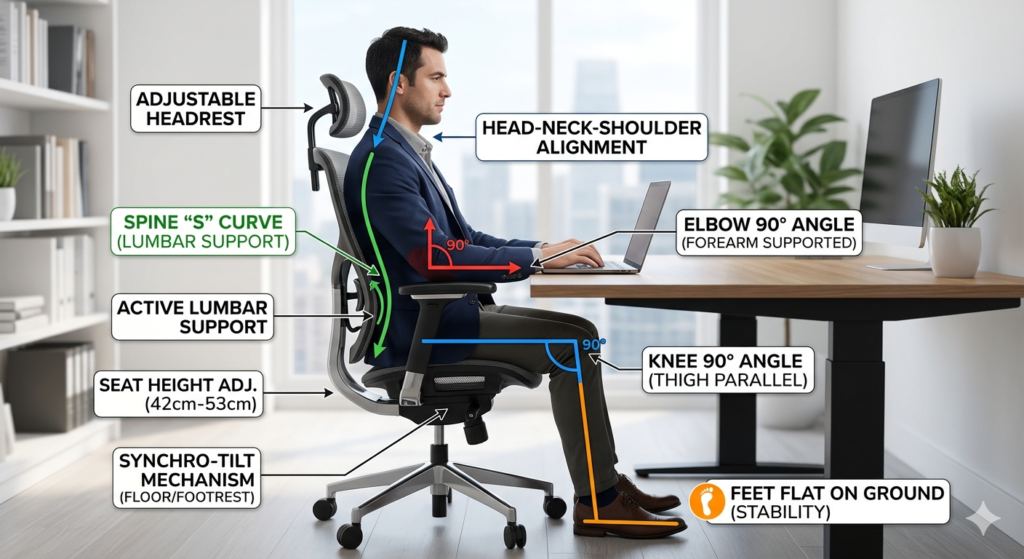
Your lower back has a natural inward curve. A great chair should mirror this. Look for “Active Lumbar Support” that moves with you as you recline, ensuring the “gap” in your lower back is always filled.
The “Waterfall” Seat Edge and Circulation
Notice how some chairs make your legs feel numb after an hour? That’s due to poor blood flow. A “Waterfall” edge—a seat that curves slightly downward at the front—relieves pressure on the back of your thighs, preventing that “pins and needles” sensation.
4D Armrests: Protecting Your Shoulders and Wrists
Armrests shouldn’t just go up and down. 4D means they adjust in four directions: Height, Width (side-to-side), Depth (front-to-back), and Pivot (angle). This ensures your elbows stay at a perfect 90-degree angle, preventing carpal tunnel and shoulder strain.
3. Making the Choice: What is the Best Ergonomic Office Chair for You?
The “best” chair depends on your body type, budget, and how many hours you clock in.
| Category | Top Contender | Key Feature | Warranty |
| The Gold Standard | Herman Miller Aeron | Breathable Pellicle Mesh | 12 Years |
| The Tech Lover’s Choice | Steelcase Gesture | 4D Arms for Tablet/Laptop use | 12 Years |
| Best Value Hero | ErgoChair Pro | Full Adjustability under $600 | 2-5 Years |
The ROI of Sitting Right
Think of a premium ergonomic office chair as a 10-year investment. A $1,200 chair backed by a 12-year warranty costs you roughly $0.27 per day. Compared to a single physical therapy session (which can cost $150+), the preventative ROI is a no-brainer.
4. The “3-Minute Tune-Up”: Setting Up for Success
Buying the chair is only half the battle. You need to “calibrate” your office chair ergonomic settings to your unique frame:
- The Floor Test: Adjust the height so your feet are flat on the floor. If your feet dangle, your lower back will pay the price. Use a footrest if necessary.
- The 2-Finger Gap: Sit all the way back. There should be a gap about the width of 2 or 3 fingers between the edge of the seat and the back of your knees.
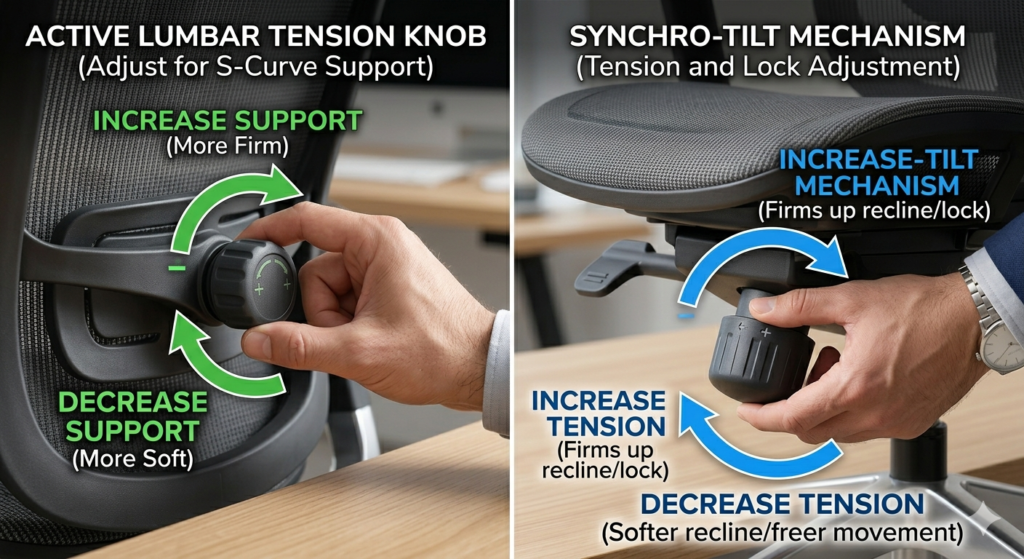
- The Recline Tension: Adjust the tilt tension so the chair supports your weight as you lean back but doesn’t feel like a catapult launching you forward when you sit up.
5. FAQ: Solving Your Sitting Dilemmas
Q: What is the best ergonomic office chair for back pain? A: Look for chairs with a “Synchro-tilt” mechanism. This allows the backrest to recline at a higher ratio than the seat, keeping your torso open and your spine aligned even when you’re relaxing.
Q: Mesh vs. Upholstery: Which is better? A: Mesh is king for “hot sitters” or warm offices because of its ventilation. However, high-quality upholstery (like the Steelcase Leap) offers a more “cradled” feel and better pressure distribution for very thin users.
Q: Is a headrest necessary? A: If you spend most of your time leaning forward typing, no. But if your job involves a lot of reading, thinking, or phone calls, a headrest can relieve about 10–12 lbs of weight from your neck muscles.
Conclusion: Take a Stand by Sitting Right
In our digital age, your chair is your most frequent interface with the world. An ergonomic office chair isn’t just furniture; it’s an act of self-care. It tells your body that you value the work you do and the person doing it.
My gentle advice? Don’t wait for a slipped disc to make the switch. If your current seat feels like a struggle, it’s time to upgrade your cockpit. Start with the “3-Minute Tune-Up” today, and when you’re ready, invest in a chair that supports your dreams—and your spine.