
Let’s be honest: your back doesn’t care about a “luxury” brand name, but it definitely feels the difference between a $200 foam slab and a $1,500 precision-engineered machine. When you start looking for an ergonomic chair buying guide, the price gaps can feel like a scam. Why does one chair cost as much as an iPhone while another looks identical for a fraction of the price?
The truth lies in the “active” support. A cheap chair holds you up; a great chair moves with you. At WorkDeskLab, we’ve spent months testing the tension, pivot points, and mesh durability of the market’s heavy hitters to help you decide where your hard-earned money actually goes.
Budget vs. Luxury: Why Lumbar Support Isn’t Created Equal
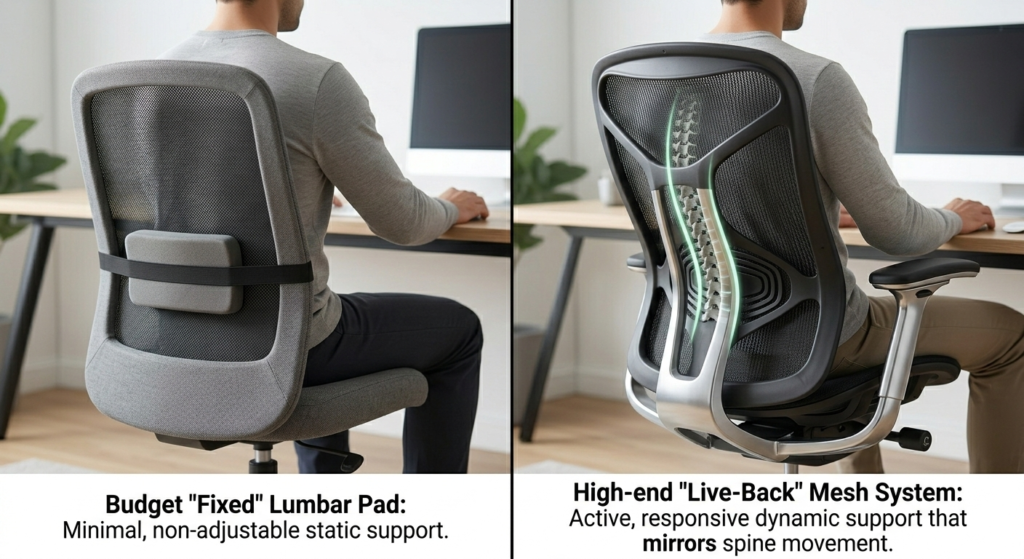
The $200 entry-level chairs usually offer “static” lumbar support. This means a plastic or foam piece that stays in one place. It’s fine for a 2-hour session, but for a 10-hour workday, it can actually cause pressure points.
Once you cross the $800 threshold, you’re paying for “dynamic” support. These chairs feature backrests that tilt and flex based on your spine’s micro-movements. We found that higher-end models from brands like Steelcase or Herman Miller use weight-sensitive mechanisms that eliminate the need for constant knob-fiddling.
The $200 – $500 Tier: Reliable “Starter” Comfort
If you’re a student or a remote worker on a budget, you don’t need a masterpiece—you just need to stop the slouch.
- The Focus: Breathability and height adjustment.
- The Reality: At this price, you’ll likely get 2D or 3D armrests (up/down/sideways) and a standard gas lift.
- WorkDeskLab Tip: Look for chairs with a synchro-tilt mechanism. This ensures that as you lean back, the seat pan tilts at a smaller ratio, keeping your feet flat on the ground and preventing “leg numbness.”
The $600 – $900 Tier: The Sweet Spot for 4D Armrests
This is where the “Work From Home” professionals should live. In this bracket, the build quality shifts from plastic to reinforced glass-fiber or aluminum.
- 4D Armrests are Mandatory: At this price, your armrests should move in four directions: height, width, depth, and pivot. This is crucial for preventing Carpal Tunnel and neck strain during long typing sessions.
- Material Science: You’ll start seeing specialized mesh that doesn’t “bottom out” after six months.
- Certification Matters: Ensure any chair in this range is BIFMA Certified, meaning it has passed rigorous industrial safety and durability tests.
The $1,000+ Tier: Is the “God Tier” Truly Worth It?
If you have a pre-existing back injury or a $5,000 workstation, the flagship chairs are an investment in “future-proofing” your body.
| Feature | The $300 Choice | The $1,200 Investment |
| Warranty | 1–3 Years (Limited) | 12 Years (Total Coverage) |
| Base Material | Nylon/Plastic | Die-cast Aluminum |
| Adjustability | Manual Levers | Intuitive/Automatic Tension |
| Resale Value | Low | High (Holds 50% value for years) |
Does Weight Matter? Choosing for Your Frame
One of the biggest mistakes we see is a 250lb user buying a chair rated for 200lb. The hydraulic cylinder will fail within months.
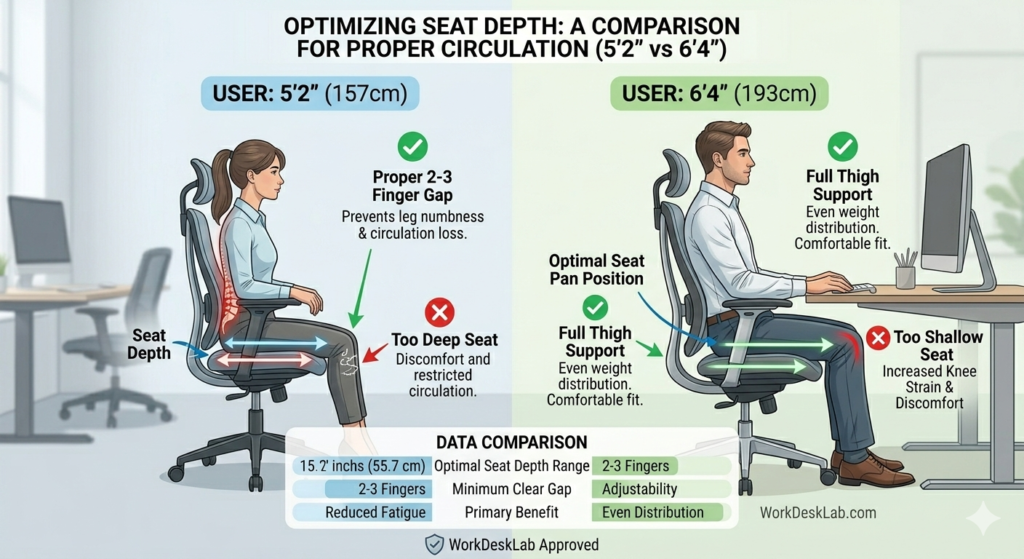
Short Users (<5’4″): Look for a seat depth adjustment that lets you sit all the way back without the front edge cutting into your calves.
Tall Users (>6’1″): Prioritize a high backrest and a “Long” gas lift option to avoid sitting with your knees higher than your hips.
FAQ: Cutting Through the Marketing Noise
Q: Is a headrest necessary? A: Only if you recline often. For upright typing, a headrest often goes unused or, worse, pushes your head into “tech neck” territory.
Q: Mesh vs. Fabric—which is better for back pain? A: Mesh offers better pressure distribution (no “hot spots”), while fabric/foam offers a more “cushioned” feel. For long-term spinal health, high-tension mesh usually wins.
Q: Why does my back still hurt in an expensive chair? A: You likely haven’t set the lumbar support height correctly. It should sit in the natural “small” of your back, not against your mid-spine.
Final Verdict
Don’t buy a chair based on how it looks in a Pinterest photo. Buy it based on your seated duration. If you’re at your desk for 8+ hours, the ergonomic chair buying guide logic is simple: spend as much as your budget allows to get 4D armrests and a 10-year warranty. Your 50-year-old self will thank you.
Need the perfect desk to match? Read our latest guide on [How to Choose an Electric Standing Desk] to complete your ergonomic setup!