
If you’ve ever sat down at your computer only to find yourself distracted by a tangled web of cables or shifting uncomfortably because of a nagging lower back ache, you aren’t alone. Most professionals struggle to balance a clean aesthetic with actual physical comfort. Achieving a minimalist ergonomic desk setup isn’t just about buying a white desk and a small plant; it’s a strategic approach to workspace design that reduces cognitive load and protects your musculoskeletal health.
In this guide, we’re moving past the “Pinterest-pretty” photos to look at the hard science of productivity. We’ve tested dozens of layouts to find the sweet spot where ergonomic workspace optimization meets high-end minimalism.
The Core Philosophy: Why Minimalism and Ergonomics Must Coexist
The “minimalist” movement often gets a bad rap for being impractical. However, from a neurological perspective, visual clutter equals mental clutter. When your desk is stripped down to the essentials, your brain has fewer “objects” to process, allowing for deeper focus.
But a clean desk is useless if it leaves you with carpal tunnel syndrome. That’s where ergonomic workspace optimization comes in. By aligning your tools to your body’s natural posture, you eliminate the micro-stressors that lead to burnout.
The Cost of Visual Noise
Research suggests that a cluttered environment can increase cortisol levels. A minimalist desk setup acts as a visual “reset,” telling your brain it’s time to work, not manage chaos.
The Ergonomic Matrix: 2026 Standards
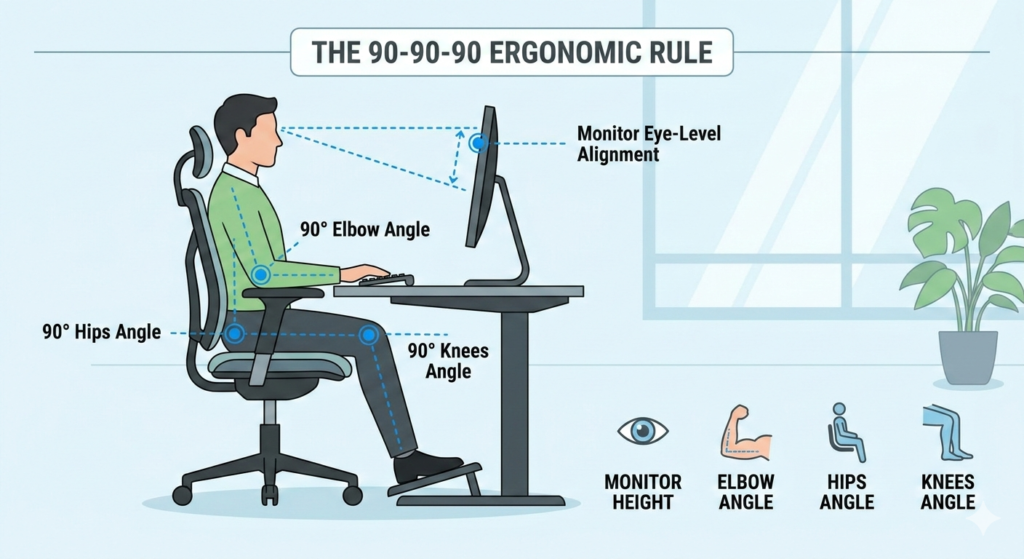
Before you buy new gear, you need to know your numbers. Ergonomics is a game of angles and inches.
| Feature | Recommended Standard | Impact on Health |
| Monitor Height | Top 1/3 of screen at eye level | Reduces neck strain (Cervical Spine) |
| Elbow Angle | 90° to 100° (Resting on armrests) | Prevents Tendonitis & Shoulder fatigue |
| Viewing Distance | 20 to 30 inches (Arm’s length) | Minimizes digital eye strain |
| Desk Height | 28″ – 30″ (Standard) / Adjust to Elbow | Ensures neutral wrist position |
10 Science-Backed Ideas for Your Minimalist Workspace
1. The “Floating” Screen Strategy
The easiest way to reclaim desk real estate is to get your monitor off its stock stand. Using a high-quality monitor arm not only clears the “footprint” on your desk but allows for precise ergonomic workspace optimization. You can tilt, swivel, and height-adjust based on your posture throughout the day.
2. Implementation of the 90-Degree Rule
Whether you are using a sitting or standing desk, your elbows should always be at a 90-degree angle. This prevents you from “reaching” for your keyboard, which is the leading cause of shoulder tension.
3. Biophilic Integration
Minimalism doesn’t mean “sterile.” Adding a single living plant—like a Snake Plant or Pothos—has been shown to improve air quality and reduce stress. Just keep it to one; any more and you’re back to clutter.
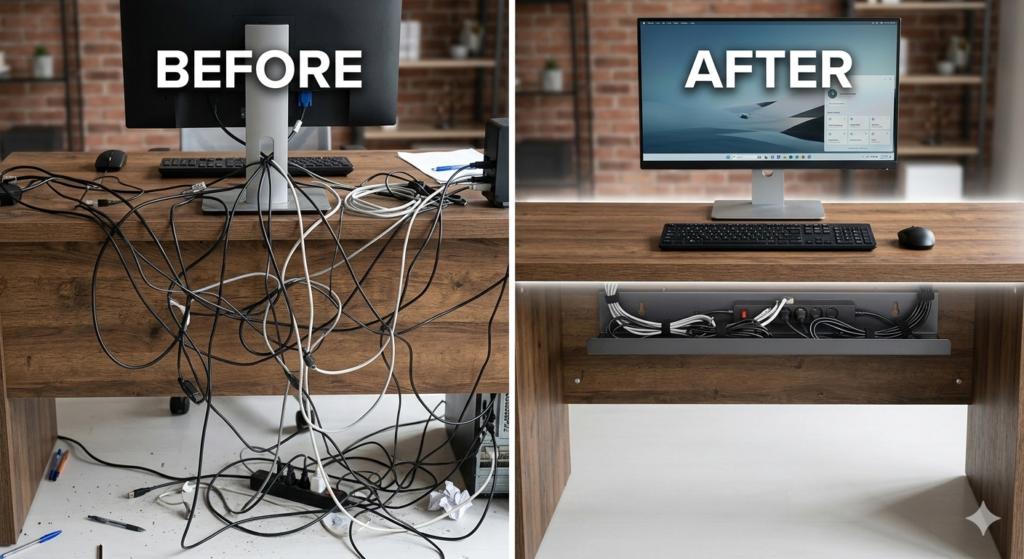
4. Advanced Cable Management
A true minimalist ergonomic desk setup is defined by what you don’t see. Use an under-desk cable tray and magnetic cable ties. If a wire isn’t moving, it should be hidden.
5. Task Lighting vs. Ambient Lighting
Avoid harsh overhead lights. Use a monitor light bar (which saves space) to illuminate your workspace without creating screen glare. This protects your eyes during long deep-work sessions.
6. The “One-In, One-Out” Rule for Accessories
To maintain your minimalist desk setup, never add a new gadget without removing an old one. This keeps your “Productivity Hub” lean and intentional.
Critical Accessories for a Clutter-Free Hub
Investing in the right tools is cheaper than physical therapy. When selecting gear, look for “Multi-functional” and “Slim profile.”
- The Ergonomic Chair: Look for adjustable lumbar support and seat pan depth.
- The External Peripheral Duo: A mechanical 75% keyboard and a vertical mouse are the gold standards for wrist health.
- The Desk Mat: A felt or vegan leather mat defines your “work zone” and adds a tactile element to a minimalist surface.
For those looking to dive deeper into the medical necessity of these movements, the Mayo Clinic provides an excellent breakdown on why standing or moving during work is vital.
FAQ: Solving Your Desk Setup Dilemmas
How do I start a minimalist setup on a budget?
Start by decluttering. You don’t need to buy anything to remove 50% of the junk on your desk. Next, focus on a monitor arm—it’s the highest ROI ergonomic upgrade for under $50.
Is a standing desk worth it?
Yes, but only if you use it correctly. The goal isn’t to stand all day; it’s to switch positions every 30–60 minutes to keep blood flowing.
How do I hide laptop cables?
Use a vertical laptop stand and a single-cable USB-C docking station. This allows you to tuck the laptop behind your monitor and run only one wire across the desk.
Final Thoughts
Building a minimalist ergonomic desk setup is an iterative process. It’s about removing the friction between your body and your work. Start with the measurements in our Ergonomic Matrix, clear the clutter, and watch your productivity—and your back—thank you.