
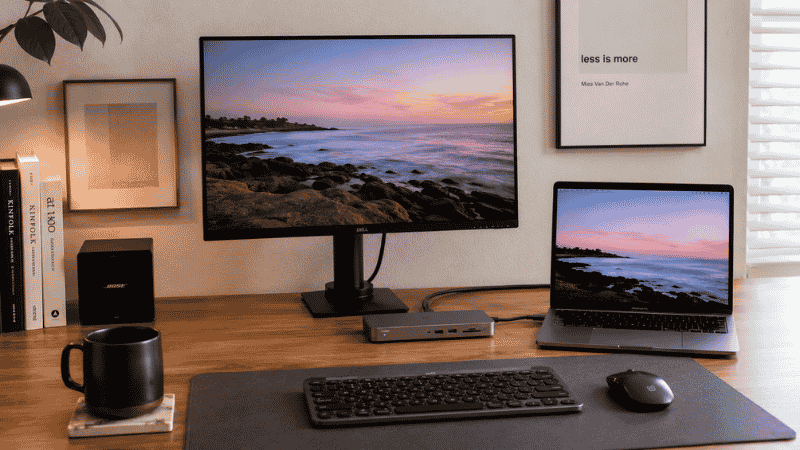
The modern laptop has a port problem.
At some point in the last decade, manufacturers decided that thin was more important than functional, and ports started disappearing. The result: a lot of people sitting at home office desks with a machine that has one USB-C port, maybe two, and a list of things that need to plug in. A monitor. An external keyboard and mouse. A webcam. A phone charger. An external drive. A microphone. The math doesn’t work.
So they compromise. They unplug the keyboard to charge the phone. They reach around to the back of the laptop to swap cables. They keep a pile of adapters in a drawer that they’re constantly misplacing. The setup works, technically, but it has friction — small, constant friction that adds up across eight hours and five days.
A USB hub or docking station solves this at the source. One device goes between the laptop and everything else, so everything stays connected and the laptop needs only one cable. The problem is that the terminology is confusing, the options are overwhelming, and most buying guides assume you already know the difference between USB-A, USB-C, USB 3.0, and Thunderbolt.
This guide doesn’t assume that. It explains what each type does, when each one makes sense, and how to pick the right one without overbuying or underbuying.
— Daniel Shaw, 7 years working from home across three different laptops with progressively fewer ports
Key Takeaways
- A USB hub expands the number of USB ports available from one connection — the simplest, cheapest solution for needing more ports
- A USB-C hub does the same thing from a USB-C port, and often adds non-USB ports (HDMI, SD card, ethernet) in a compact form
- A USB-C docking station is a larger, more powerful version — supports monitor output, charging, ethernet, and multiple peripherals from a single cable connection
- Powered USB hubs have their own power supply and can charge devices and drive power-hungry peripherals — unpowered hubs draw from the laptop and have limits
- For most home office setups: a USB-C hub covers basic needs under $50; a docking station is the right upgrade if you use an external monitor and multiple peripherals daily
USB Hub vs USB-C Hub vs Docking Station: The Actual Differences
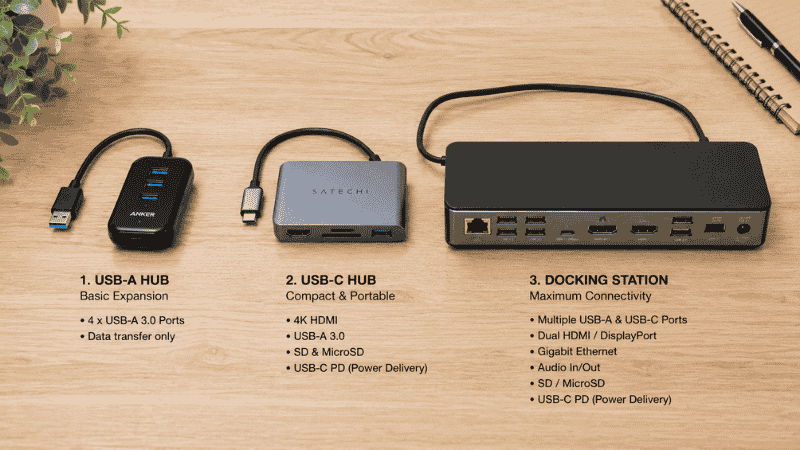
These three products are often confused because they overlap in function and the marketing doesn’t help. Here’s what each one actually is:
USB hub (USB-A): A device that takes one USB-A port (the rectangular kind) and turns it into multiple USB-A ports. Simple, cheap, limited. It adds USB ports but nothing else — no video output, no ethernet, no charging pass-through beyond basic 5W. If you just need more USB-A ports for a mouse, keyboard, and USB drive, this is all you need.
USB-C hub: Takes one USB-C port and expands it into multiple connections — typically a mix of USB-A ports, USB-C ports, HDMI or DisplayPort for a monitor, SD card slots, and sometimes ethernet. This is the most popular category for modern laptop users because one small device (often the size of a deck of cards) connects most of what a home office needs through a single cable. The limitation: most USB-C hubs don’t support multiple monitors or high-wattage charging without a powered version.
USB-C docking station: A larger, more capable device that connects via a single USB-C or Thunderbolt cable and provides a full desktop-level port selection — multiple USB ports, one or two HDMI/DisplayPort outputs for dual monitors, ethernet, headphone jack, SD card, and 60-100W charging for the laptop. It sits on or under the desk and everything plugs into it. The laptop connects with one cable and immediately has access to the full setup.
The size and price difference reflects the capability difference. A USB-C hub costs $30–$60 and is pocket-sized. A docking station costs $80–$200+ and sits on the desk like a small appliance. Both solve the port problem — the right choice depends on how many things you need connected.
Powered USB Hub: When Power Delivery Matters
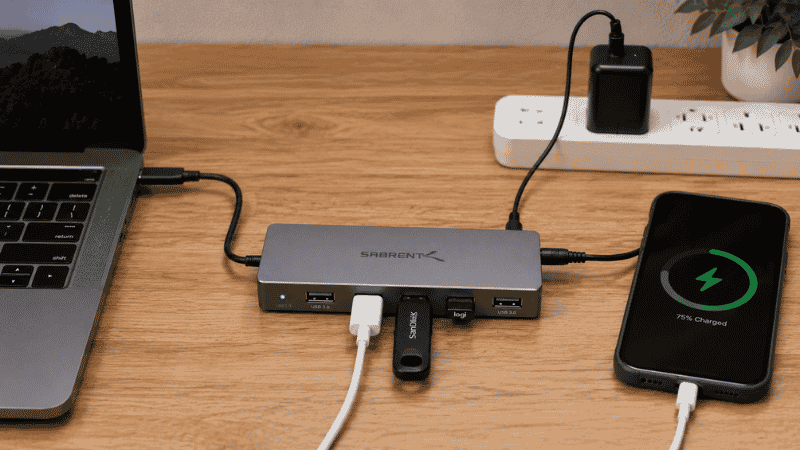
This distinction matters more than most buyers realize before they’ve bought the wrong thing once.
An unpowered USB hub draws all its power from the laptop port it’s connected to. This works fine for low-power devices — a wireless mouse receiver, a USB keyboard, a flash drive. It does not work reliably for power-hungry devices: charging a phone quickly, running an external hard drive, or powering a webcam with active lighting.
A powered USB hub has its own external power supply (usually a wall adapter). It can deliver full power to every port simultaneously, regardless of what the laptop is doing. Devices charge faster, external drives operate reliably, and the hub itself doesn’t draw from your laptop’s battery.
When to choose powered:
- You’re charging devices from the hub (phone, earbuds, anything that needs more than 5W)
- You’re running external hard drives or SSDs (which can be power-sensitive)
- You have multiple devices plugged in simultaneously and need consistent power delivery
- Your laptop is a MacBook or similar machine that’s sensitive about how much power peripherals draw
When unpowered is fine:
- You’re only connecting a mouse, keyboard, and USB drive simultaneously
- You need a portable hub for travel rather than a desk-based solution
- Budget is the primary constraint and your peripheral load is genuinely light
USB C Docking Station: The One-Cable Desk Setup
If you use a laptop as your primary work machine and you have an external monitor, a docking station is arguably the highest-return desk upgrade available — more impactful than most people expect until they use one.
The experience: you sit down at your desk, plug in one USB-C cable to the laptop, and everything activates simultaneously. The external monitor turns on, the keyboard and mouse connect, the ethernet kicks in, the webcam comes online. The laptop charges. When you’re done, you unplug one cable, the laptop is completely disconnected from everything, and you can pick it up and leave.
Compared to the alternative — plugging in a monitor cable, a USB hub, a power cable, and ethernet separately every morning and unplugging all of them every evening — the one-cable experience changes the daily rhythm of using a laptop at a desk. It makes the desk setup feel permanent and effortless rather than temporary and fiddly.
What to check before buying a docking station:
- Thunderbolt vs USB-C: Thunderbolt docks (Thunderbolt 3 or 4) offer higher bandwidth and support multiple 4K monitors, but require a Thunderbolt port on your laptop. Not all USB-C ports are Thunderbolt. Check your laptop specs before buying a Thunderbolt dock — a regular USB-C dock will work on most USB-C ports but with more limited monitor and bandwidth capabilities.
- Monitor support: Confirm the dock supports the number of monitors and resolution you need. Most mid-range docks support one 4K monitor; higher-end docks support two. For dual monitor setups, verify compatibility explicitly.
- Wattage for charging: Docks range from 45W to 96W laptop charging. If your laptop’s charger is 65W or higher, get a dock rated to at least match — otherwise the dock will charge the laptop but slowly, or the laptop may discharge under heavy load.
- Mac vs Windows compatibility: Most USB-C docks work on both, but some features (especially multi-monitor support) vary between macOS and Windows. Check the product’s compatibility notes for your specific operating system.
USB Splitter: What It Is and When It’s the Right Answer
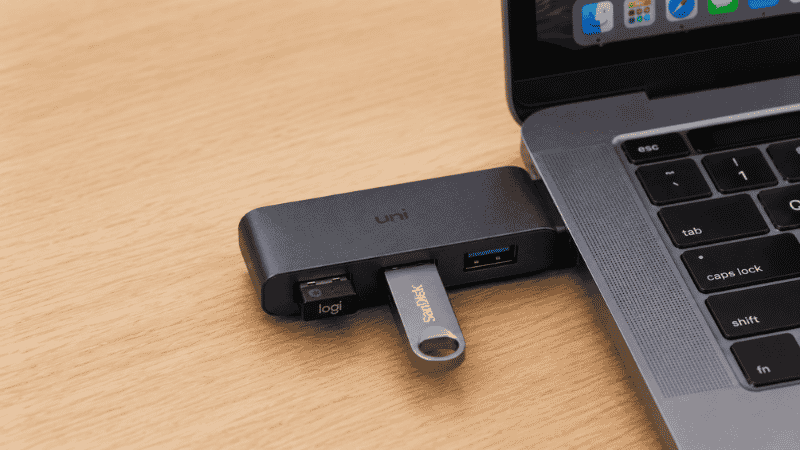
A USB splitter is the simplest version of a hub — a short cable or small adapter that takes one USB port and splits it into two or three ports. No power supply, no HDMI, no extras. Just more USB ports.
The USB splitter is the right answer when: you need one or two more USB-A ports, you don’t want to spend more than $10–$15, and you’re not trying to charge anything or run power-hungry devices. It’s the solution to “I have a mouse and a USB drive and only one port” — nothing more, nothing less.
The USB splitter is the wrong answer when: you need to charge devices, output to a monitor, or connect more than two or three peripherals. The bandwidth limitations of a basic splitter mean that running multiple devices simultaneously can cause connection instability, slow transfers, or intermittent disconnections. A proper hub — even an inexpensive one — handles this more reliably.
How to Choose the Right USB Hub for Your Desk
Work through these four questions:
1. What port type does your laptop have?
If you have USB-A ports available: a standard USB hub works and is cheapest. If you only have USB-C (common on newer MacBooks, modern Windows ultrabooks): you need a USB-C hub or docking station. If you have Thunderbolt 3 or 4: you can use any USB-C hub, but a Thunderbolt dock unlocks the full bandwidth and multi-monitor capability.
2. Do you use an external monitor?
No external monitor: a USB hub is sufficient. One external monitor: a USB-C hub with HDMI output handles this for most setups. Two external monitors, or 4K at high refresh rate: you need a docking station with sufficient bandwidth.
3. How many devices do you connect simultaneously?
Two to three low-power devices (mouse, keyboard, USB drive): any hub. Four or more devices, or any charging: consider a powered hub. Full home office setup (monitor, mouse, keyboard, webcam, ethernet, charging): docking station.
4. Is this for desk use or travel?
Desk use: a powered hub or docking station is worth the larger size for the reliability advantage. Travel: a compact unpowered USB-C hub stays in the bag and works anywhere.
Where to Put a USB Hub on Your Desk
The position of the hub matters for daily usability more than most people think about before buying.
A hub positioned at the back of the desk — out of sight — keeps the desk surface clean but makes plugging and unplugging devices inconvenient. You’re reaching around constantly for the ports.
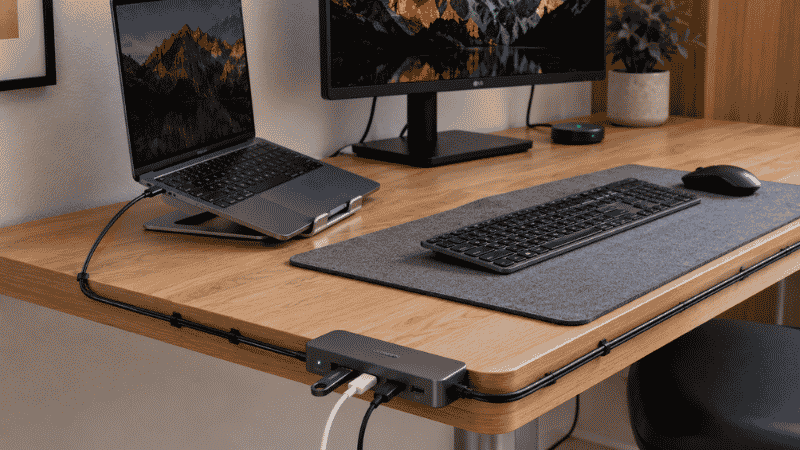
A hub positioned at the front edge or side of the desk — or clipped to the desk edge with a mount — keeps ports accessible without being visually dominant. For USB-A ports you use occasionally (flash drives, phones), accessible placement is worth the slightly less minimal look.
Docking stations typically sit flat on the desk near the laptop, or can be stored under the desk if your cable management setup supports it. → For routing the cables from a hub or dock cleanly: Desk Cable Management Guide.
One practical note: for hubs with multiple cables plugged in, a cable management tray under the desk that holds the hub itself is the cleanest solution — the hub lives under the desk, cables route up to the devices, and the desk surface has only the peripheral devices themselves rather than the hub and its cable cluster. → More on managing desk surface organization: Desk Organization Ideas.
USB Hub for MacBook: Specific Considerations
MacBooks — particularly the M-series models — have specific quirks with USB hubs and docks that are worth knowing:
Most modern MacBooks have Thunderbolt 4 ports that can support Thunderbolt docks for maximum capability, but they’re also compatible with standard USB-C hubs at lower bandwidth. The limitation on MacBooks is typically multi-monitor support — macOS has restrictions on how many external displays certain M-chip MacBooks can drive, regardless of what the dock supports. Check Apple’s specifications for your specific MacBook model if running multiple monitors is your goal.
MacBooks also tend to be more sensitive about charging than Windows laptops. A hub or dock that delivers less than the MacBook’s rated charging wattage will charge the machine but slowly, or may not keep up with power consumption during heavy use. For MacBook Pro models that use 67W or 96W chargers, a dock rated for at least that wattage keeps the battery topped up rather than slowly draining.
If You Only Have 10 Minutes to Fix Your Port Problem Right Now
If you currently have zero hubs and your desk has cable/port frustration: the fastest intervention is a basic USB-C hub with HDMI in the $35–$50 range. It connects most standard home office peripherals and a monitor from one port with no installation required. Order it, plug it in when it arrives, and the daily cable-swapping friction disappears immediately.
If you have a hub that’s not working well (devices dropping connection, slow transfers, charging issues): check whether it’s powered or unpowered. If unpowered and you’re running multiple devices simultaneously, that’s almost certainly the cause. A powered replacement costs $10–$20 more and solves the problem.
Frequently Asked Questions
What is a USB hub and what does it do?
A USB hub takes one USB port and expands it into multiple ports, allowing you to connect more devices to a laptop or computer than it has built-in ports for. Basic USB hubs add USB-A ports only. USB-C hubs add a mix of port types including USB-A, USB-C, HDMI, and sometimes ethernet and SD card slots. Docking stations are larger hubs with full-size ports, monitor output support, and high-wattage charging — designed for permanent desk setups rather than travel use.
What is the difference between a USB hub and a docking station?
A USB hub is a compact device that adds ports — typically for peripherals like a mouse, keyboard, and flash drive. A docking station is a larger, more capable device that also handles monitor output and high-wattage laptop charging, usually through a single Thunderbolt or USB-C cable. Hubs cost $20–$60 and are often portable; docking stations cost $80–$200+ and are designed for fixed desk setups. If you use an external monitor and multiple peripherals daily, a docking station provides a cleaner, more capable setup.
Do I need a powered USB hub?
If you’re only connecting low-power devices like a mouse, keyboard, and flash drive simultaneously, an unpowered hub is sufficient. If you’re charging a phone, running an external hard drive, or connecting four or more devices at once, a powered hub with its own wall adapter is more reliable and worth the small additional cost. Unpowered hubs draw from the laptop’s USB power budget, which has limits — exceeding it causes connection instability or slow charging.
Is a USB-C hub the same as a USB-C docking station?
No — they’re on a spectrum. A USB-C hub is small, compact, and typically bus-powered (no wall plug). It adds ports and usually includes one HDMI output and maybe SD card and ethernet. A USB-C docking station is larger, has its own power supply, supports multiple monitors, delivers high-wattage charging, and has more ports in full-size format. Hubs are for travel and moderate home office use. Docking stations are for permanent desk setups with external monitors and multiple peripherals.
What USB hub should I get for a MacBook?
For basic peripheral use (mouse, keyboard, flash drive) with one external monitor: a USB-C hub with HDMI output in the $40–$60 range works well. For a full desk setup with charging: a Thunderbolt 4 docking station rated for at least 67W charging (96W for MacBook Pro 16-inch). Check Apple’s specifications for your specific MacBook model regarding how many external displays are supported — M-chip MacBooks have varying multi-monitor capabilities regardless of what the dock supports.
One Cable, Everything Connected
The port shortage on modern laptops is a genuine frustration, but it’s a solvable one. A USB hub adds ports immediately for under $50. A docking station transforms the daily experience of using a laptop at a desk — one cable in, everything on, one cable out, laptop free to go.
The decision is simpler than the product landscape makes it seem: if you use an external monitor and multiple peripherals daily, get a docking station. If you need a few more USB ports without the monitor complexity, get a USB-C hub. If you just need one or two more USB-A spots, get a basic hub or splitter.
The right one removes friction you’ve been living with so long you might not notice it’s there.
More from WorkDeskLab:
- How to Set Up a Home Office That Actually Works
- Desk Cable Management — Hide Every Wire Without Drilling
- Desk Organization Ideas That Actually Stick
- Desk Accessories — What’s Worth Buying and What Isn’t
References: USB Implementers Forum — USB specification and power delivery standards (usb.org) · Intel Corporation — Thunderbolt technology specifications and compatibility guidelines (intel.com/thunderbolt)