
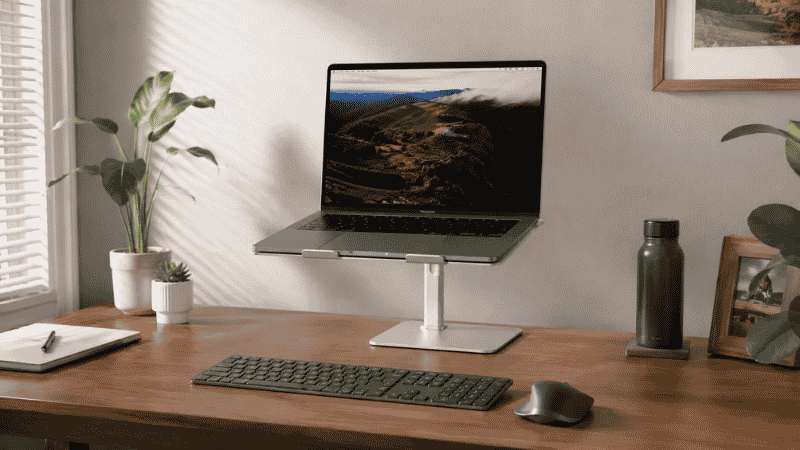
There’s a question that comes up every time someone starts researching laptop stands that nobody’s article seems to answer directly:
If I raise my laptop, where does the keyboard go?
It’s a practical question that reveals the actual trade-off of using a laptop stand. When you raise the screen to eye level — which is the whole point — the built-in keyboard ends up at the wrong height for typing. You’d be reaching up toward your chest, which is worse than where you started. So yes: using a laptop stand properly means using an external keyboard and mouse, positioned at elbow height on the desk surface while the laptop screen sits elevated above.
This is the part most laptop stand guides leave out. And it’s important, because it changes whether a stand is a $30 fix or a $30 fix plus $50 in peripherals.
That said, it’s also genuinely worth it. The research on laptop ergonomics is unusually consistent: working on a flat laptop all day — head tilted down, shoulders rounding forward — is one of the most reliable ways to develop neck and upper back pain. A stand paired with an external keyboard eliminates the problem at the source. Most people who make the change notice the difference within a week.
This guide covers what to look for, which type of laptop stand fits which situation, and the questions worth answering before you buy.
— Daniel Shaw, 7 years working from home, one laptop stand that changed how my neck felt by day three
Key Takeaways
- A laptop stand raises the screen to eye level, eliminating the downward head tilt that causes neck strain — but requires an external keyboard and mouse to work ergonomically
- Research published in the journal Applied Ergonomics found that laptop users experience significantly higher neck and shoulder muscle activity than desktop users — the screen-keyboard linkage is the core problem a stand solves
- The correct laptop screen height: top of the screen at or just below eye level (the same target as for an external monitor)
- Adjustable laptop stands offer height flexibility for sitting and standing; fixed stands are more stable and often better looking but commit you to one height
- Aluminum and wooden laptop stands are the most durable materials; plastic stands tend to flex under the weight of larger laptops over time
Why a Laptop Stand for Desk Use Actually Matters
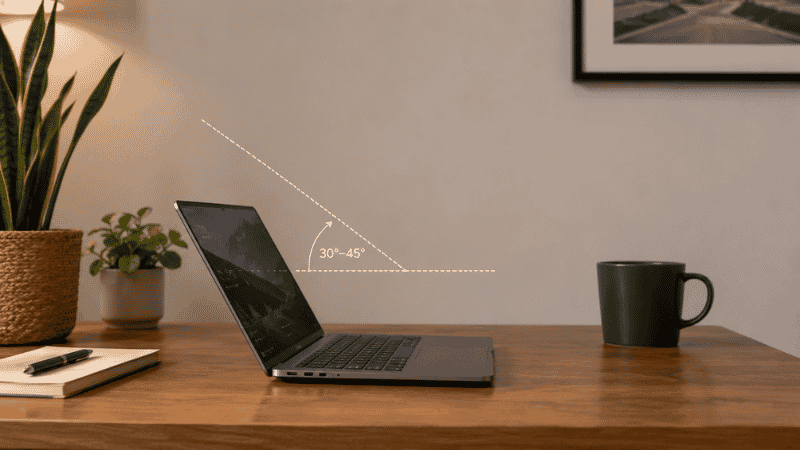
The laptop was designed for portability, not for eight hours of daily desk use. The screen and keyboard being physically connected — convenient for carrying — becomes a problem when you sit down to work: you can have the keyboard at the right height for your arms, or the screen at the right height for your eyes. You can’t have both at the same time on a flat laptop.
Most people solve this by compromising on both. The laptop sits flat on the desk, the screen is too low, and you spend the day with your head angled down at roughly 30 to 45 degrees. Research from the National Institutes of Health has found that each 10 degrees of forward head tilt effectively adds 10 pounds of strain on the cervical spine — so the 30-degree forward tilt typical of laptop use is equivalent to carrying a 30-pound load on your neck, sustained over hours.
The fix is a laptop stand that raises the screen to eye level, combined with an external keyboard and mouse at elbow height on the desk. This separates the two functions of the laptop — display and input — and lets each be at the right position for the body.
The result isn’t just less neck pain. Working with the screen at proper eye level changes how you sit. You sit straighter, your shoulders drop, and the general sense of physical effort during focused work decreases. Most people notice this within the first few days of using a stand correctly.
Adjustable Laptop Stand: The Most Versatile Option
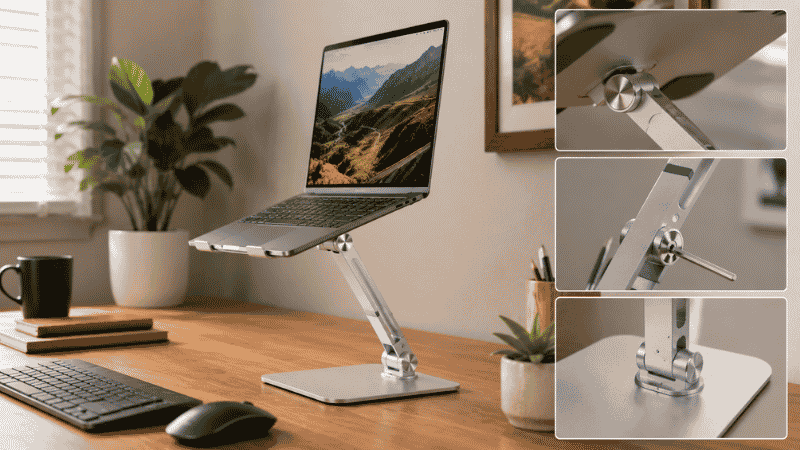
An adjustable laptop stand lets you set the height and often the tilt angle to match your specific chair height, desk height, and body proportions. It’s the right choice when:
- You’re not sure exactly what height works for you and want to experiment
- You alternate between sitting and standing at your desk and need the laptop height to change accordingly
- Multiple people use the same desk at different heights
- You use the laptop both at a desk and in other locations and want one stand that adapts
The trade-off: adjustable stands have moving parts, which adds mechanical complexity and sometimes reduces stability compared to fixed designs. The adjustment mechanism — hinges, ratchets, or telescoping arms — can wear over time and create wobble that a solid fixed stand doesn’t develop. Budget adjustable stands often have this problem faster than quality ones.
What to look for in an adjustable laptop stand: a height range that covers from your normal seated height to standing height if you use both (typically 4 to 21 inches of adjustment for a full sit-to-stand range), a stable locking mechanism that doesn’t creep under typing pressure, and compatibility with your laptop size (stands are usually rated by laptop width in inches).
Editor’s note: The most common adjustable stand problem isn’t the height range — it’s the locking mechanism. A stand that slowly drops under the weight of the laptop mid-session is more annoying than not having a stand at all. Check reviews specifically for mentions of height stability under use, not just height range.
Laptop Holder and Fixed Laptop Stand: When Simplicity Wins
A fixed laptop stand — one height, one angle — has no moving parts to wear out, no adjustment mechanisms to fail, and usually a cleaner aesthetic than adjustable alternatives. If you know your preferred working height and it doesn’t change, a fixed stand is the more stable, often better-looking, and usually lower-cost option.
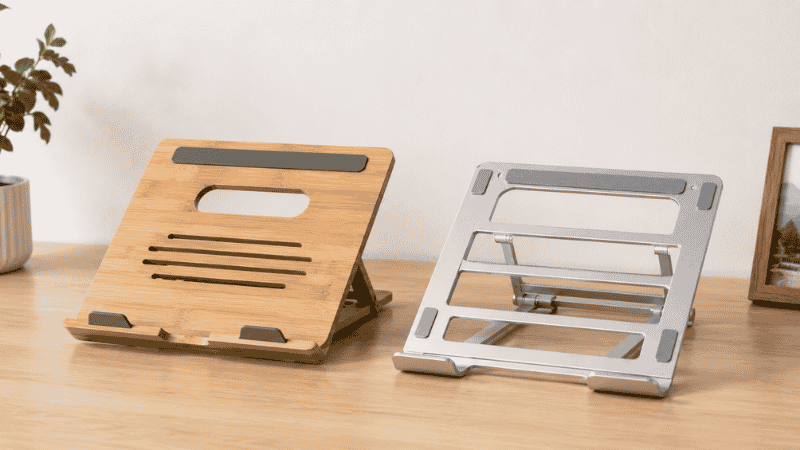
Fixed stands range from simple wedge-shaped risers to more designed pieces in wood or aluminum that look like purposeful additions to the desk rather than ergonomic equipment. The wooden laptop stand and aluminum laptop stand categories contain most of the aesthetically distinctive options.
Wooden Laptop Stand
Bamboo and wood laptop stands have become popular in the last few years, partly because they look better on a desk than plastic or metal alternatives, and partly because the material is genuinely pleasant to handle. Wood stands are typically fixed-height, which is a limitation — but they’re stable, don’t scratch laptop bases, and hold up well over years of use without the mechanical failures that can affect adjustable stands.
The practical consideration: wooden stands have more surface contact with the laptop’s underside, which can reduce airflow to the laptop’s vents. Check that the stand leaves the laptop’s ventilation ports unobstructed. Most wooden stands are designed with this in mind, but it’s worth confirming.
Aluminum Laptop Stand
Aluminum stands tend to be the best combination of aesthetics, durability, and heat dissipation. The open-frame designs that most aluminum stands use allow air to circulate under the laptop, keeping temperatures lower during extended use. Aluminum doesn’t flex under weight the way plastic does, so stability is consistent over years of use.
The downside of aluminum: it can scratch softer laptop finishes (particularly aluminum MacBooks) if there’s any movement between the laptop and stand. Look for stands with silicone or rubber contact points at the edges where the laptop rests — these protect the laptop finish and prevent sliding.
Portable Laptop Stand: For Work That Moves
A portable laptop stand folds flat or collapses to a small form factor for carrying. These are the right choice when the stand needs to travel — between home and office, in a bag for coffee shop sessions, or for people whose “desk” changes regularly.
The compromise: portability requires mechanisms that add weight and reduce stability compared to a solid fixed stand. A portable stand that weighs 200g and packs to the size of a large smartphone will wobble more than a 800g aluminum stand that never leaves the desk. For travel use, the portability benefit outweighs the stability compromise. For desk-only use, a heavier, more stable stand is generally the better choice.
What to check in portable stands: minimum height (some only offer a few inches of rise, which may not be enough to reach eye level), the stability at full extension (the higher the stand goes, the less stable it tends to be), and whether it accommodates your laptop’s size and weight.
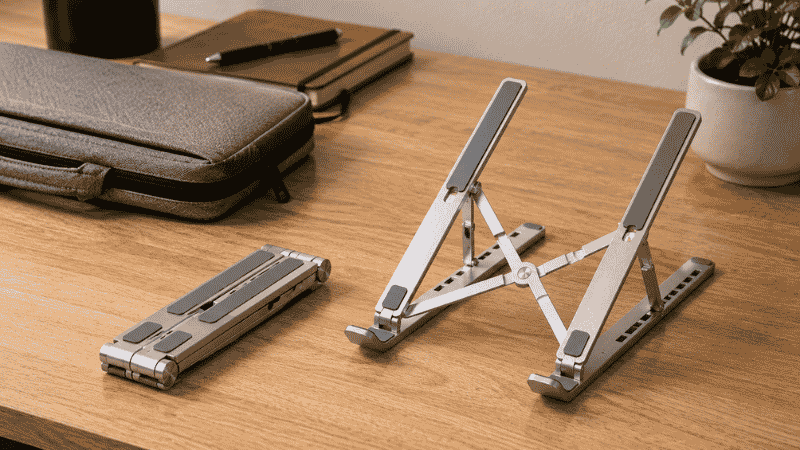
Foldable Laptop Stand: The Middle Ground
A foldable laptop stand is larger than a truly portable stand but folds for easier storage. These are common in home office setups where the stand might be moved occasionally or stored when the desk serves other purposes.
The foldable category overlaps with adjustable stands — many adjustable stands also fold. What distinguishes the specifically “foldable” category is that folding is the primary feature rather than adjustability. They collapse to a flat profile for storage but may have limited or no height adjustment when deployed.
For most home office setups that need a stand for desk use only, a foldable stand is a slightly odd middle ground — more complex than a fixed stand but less portable than a truly travel-oriented one. If you’re setting up a permanent desk and don’t plan to travel with the stand, a fixed or properly adjustable stand will serve you better.
Laptop Stand with Fan: When Cooling Is a Concern
Some laptops run hot under sustained load — particularly gaming laptops or older machines with deteriorating thermal paste. A laptop stand with integrated fans (sometimes called a cooling pad) adds active airflow under the laptop to help manage temperature.
The honest assessment: for most modern laptops used for office work, cooling pads are unnecessary. Current laptops manage their own thermal performance adequately for word processing, spreadsheets, and video calls. Where a cooling pad makes a real difference: older laptops that throttle performance when hot, gaming or creative workloads that push the GPU continuously, and laptops in hot environments where ambient temperature is already high.
If your laptop doesn’t run perceptibly hot during normal work, the fan noise and complexity of a cooling pad adds more friction than the thermal benefit justifies. An open-frame aluminum stand provides passive airflow improvement without the noise.
What to Check Before Buying a Laptop Stand
Four measurements and considerations that matter more than brand or price:
Laptop size compatibility. Stands are rated for laptop sizes — usually by screen diagonal (13″, 15″, 17″). A stand rated for up to 15″ may be physically too narrow to hold a 17″ laptop securely. Check the stand’s maximum width against your laptop’s actual width (not just screen size, since bezels vary).
Weight capacity. Most stands handle standard laptop weights fine, but gaming laptops and 17″ models can be heavy. Check the stand’s rated weight capacity if your laptop is above 5 lbs.
Riser height. Measure from your desk surface to your natural eye level when seated. Subtract the laptop screen’s lower edge height (roughly the stand’s minimum height plus the distance from desk to laptop base). The result is approximately how much rise you need. Most people need 4–8 inches of rise for seated use.
Ventilation. The stand should not block the laptop’s cooling vents. These are usually on the bottom and back of the laptop. Open-frame stands that hold the laptop at the edges rather than the center provide the best airflow.
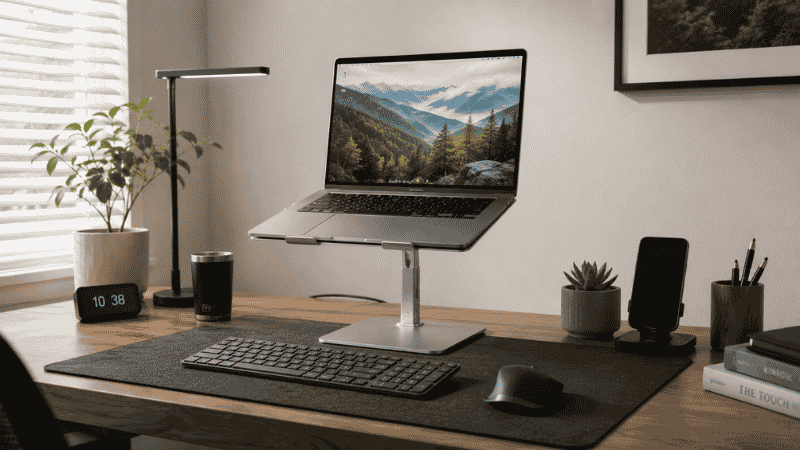
The External Keyboard Question
As noted at the start: a laptop stand works ergonomically only when paired with an external keyboard and mouse. The built-in keyboard, raised with the screen, ends up at the wrong height for typing.
This is a genuine additional cost and consideration — but the external keyboard also improves the typing experience independently of ergonomics. A full-size keyboard with proper key travel is better to type on than a laptop keyboard, and a mouse is more precise than a trackpad for most tasks.
For desk setups: a wired or wireless keyboard positioned at elbow height on the desk surface, with the laptop elevated on a stand, is the ergonomically correct configuration. A keyboard tray under the desk can position the keyboard at an even better angle. → Keyboard Tray Guide — whether you need one and which type works.
Cable management becomes more of a consideration when adding peripherals. → Desk Cable Management Guide — keeping the added cables organized.
If You Only Have 10 Minutes Right Now
Before buying anything: stack two thick books under your laptop and sit in your normal position. Does the top of the screen land near your eye level? Does your neck feel more neutral? Do your shoulders drop slightly?
If yes — a laptop stand will give you that result permanently, with a stable platform and proper ventilation. The books tell you whether the height improvement is noticeable enough to justify the purchase and the external keyboard setup.
If the book test doesn’t feel noticeably better, the issue may not be laptop height. Check your chair position, desk height, and whether you’re sitting close enough to the screen — these variables interact with screen height in ways that make the book test inconclusive.
Frequently Asked Questions
Do I need an external keyboard with a laptop stand?
Yes, to use a laptop stand ergonomically. When you raise the screen to eye level, the built-in keyboard is too high for comfortable typing. An external keyboard placed at elbow height on the desk, with the laptop screen elevated on a stand, is the correct ergonomic configuration. Using a laptop stand without an external keyboard leaves you typing with raised arms, which creates its own strain.
What height should a laptop stand be?
The stand should raise the laptop so the top of the screen is at or just below your eye level when seated in your normal working position. For most people at a standard desk, this requires 4 to 8 inches of rise. Measure from your desk surface to your eye level seated, then account for the height of the laptop’s display area to calculate the required stand height.
What is the best laptop stand for a desk?
The best laptop stand depends on your priorities. For a permanent desk setup where aesthetics matter: a fixed aluminum or wooden stand with silicone contact points. For height flexibility or sit-to-stand use: an adjustable stand with a reliable locking mechanism. For travel: a lightweight foldable stand under 300g. For all situations, open-frame designs that allow airflow under the laptop are preferable to solid platform designs.
Is an adjustable laptop stand worth it?
If your working height is consistent and you’re not alternating between sitting and standing, a fixed stand is simpler, more stable, and often better looking. An adjustable stand is worth it if you genuinely need height flexibility — for sit-to-stand use, for multiple users, or because you’re not sure what height works for you yet. The adjustment mechanism is the most likely point of failure over time, so quality matters more on adjustable stands than fixed ones.
Does a laptop stand help with posture?
Yes, when used correctly with an external keyboard. Raising the screen to eye level eliminates the forward head tilt that’s the primary driver of laptop-related neck and upper back strain. Research published in Applied Ergonomics found significantly higher neck muscle activity in laptop users compared to desktop users — the laptop stand, by separating screen from keyboard, allows the same ergonomic positioning as a desktop setup.
Raise the Screen, Protect the Neck
A laptop stand for desk use is a simple upgrade with a direct physical effect. Screen at eye level, head stays neutral, neck and shoulders don’t spend eight hours loaded with the weight of forward head tilt. The research on this is unusually clear and the mechanism is straightforward.
The external keyboard requirement adds cost and setup, but it’s also an independent improvement to how you work — most people who make the change don’t want to go back to a laptop keyboard. The stand earns its place within the first week, usually faster.
Start with the book test. If it helps, buy the stand. The rest follows naturally.
More from WorkDeskLab:
- How to Set Up a Home Office That Actually Works
- Monitor Stand — Why Your Screen Is Too Low and How to Fix It
- Keyboard Tray — Do You Actually Need One?
- Desk Organization Ideas That Actually Stick
- Desk Cable Management — Hide Every Wire Without Drilling
References: Applied Ergonomics — “Neck and shoulder muscle activity in laptop computer users: a field study” (Applied Ergonomics Journal) · National Institutes of Health — Cervical spine load and forward head posture in laptop users (NIH, National Library of Medicine)