
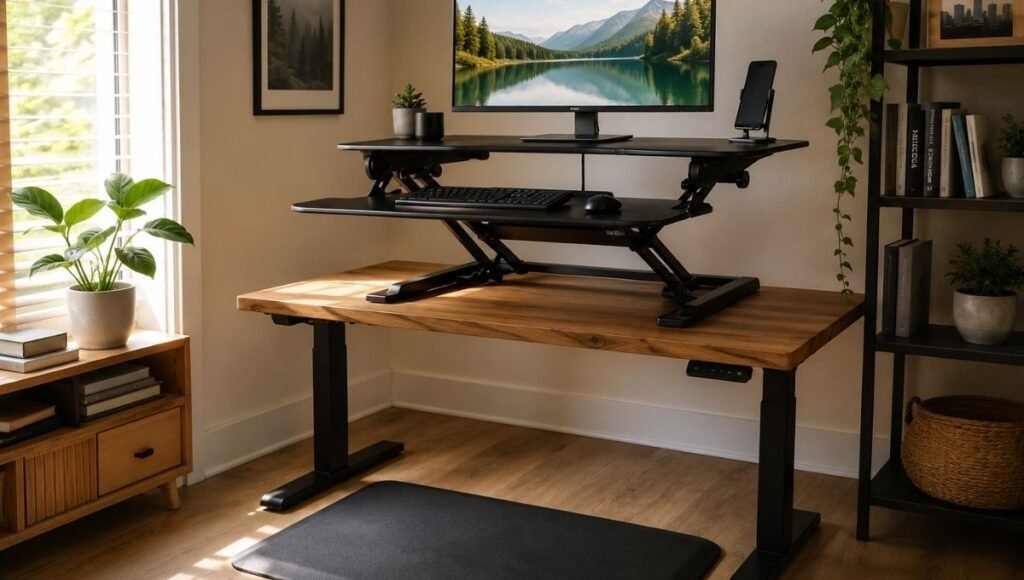
The sitting-all-day problem is real, and most people who work from home know it.
You finish a long video call, stand up to get water, and notice your lower back is tight in a way that wasn’t there two years ago. You read the research about prolonged sitting and think: I should get a standing desk. Then you look at the prices — $400, $600, $800 for a decent electric one — and the logistics of replacing a desk you actually like, and the thought quietly goes away.
A standing desk converter is the version of this that most people actually buy. It sits on your existing desk, raises your monitor and keyboard to standing height, and folds or lowers back down when you want to sit. You keep your desk. You keep your chair. You add the ability to stand when you need it, without a $600 commitment.
The catch is that converters vary wildly in quality, stability, and usability — and the cheap ones create their own problems. This guide covers what the research on sitting and standing actually says, how to evaluate a converter before buying, what the correct standing height is, and how to set up a standing desk properly so it actually improves how you feel rather than just adding a piece of furniture.
— Daniel Shaw, 7 years working from home, one standing desk converter that I use more than I expected to
Key Takeaways
- A standing desk converter sits on your existing desk surface and raises your monitor and keyboard to standing height — you keep your current desk and chair
- Research published in the British Medical Journal found that standing desk use reduced sedentary time by an average of 100 minutes per workday — the benefit is real when the setup is used consistently
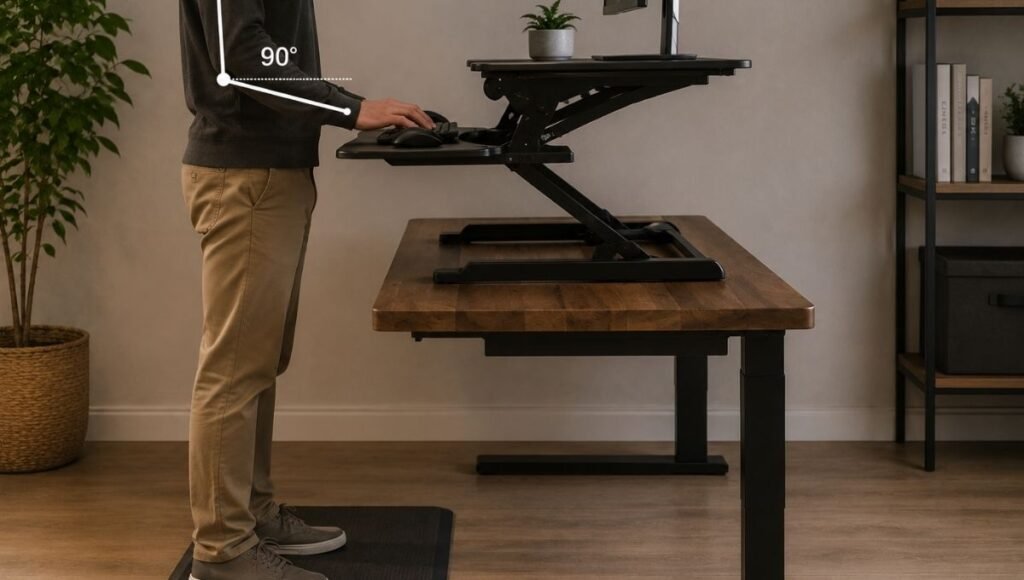
- The correct standing desk height: elbows at 90 degrees with hands on the keyboard, same principle as seated — for most people this is 40–44 inches from the floor
- A standing desk mat is not optional for extended standing — hard floors without cushioning cause foot, leg, and lower back fatigue within 30–45 minutes and are the primary reason people stop using their standing setups
- The sit-stand ratio that research supports: 30–60 minutes sitting, 5–15 minutes standing, alternating throughout the day — standing all day is not the goal and not better than sitting all day
What a Standing Desk Converter Actually Is
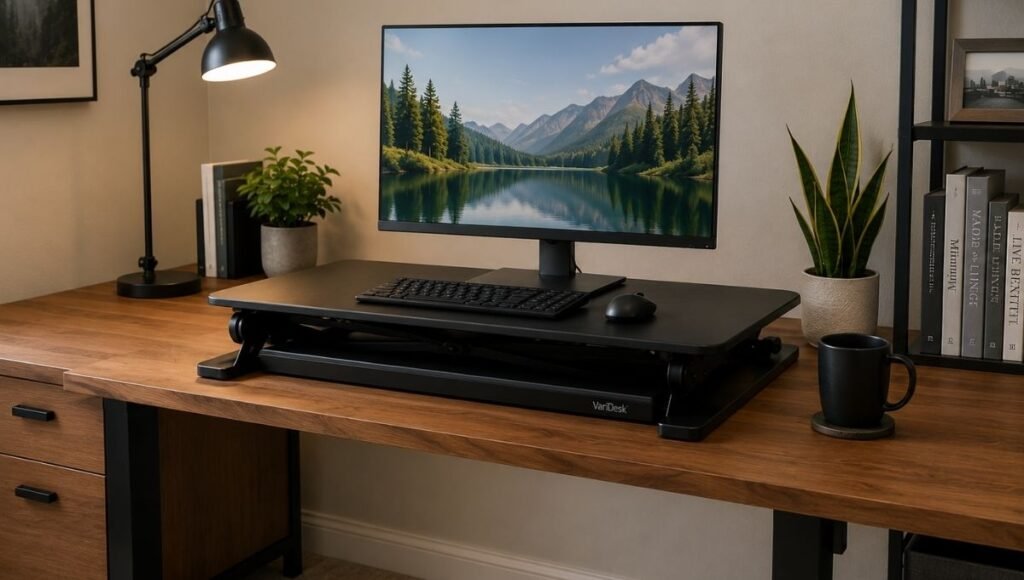
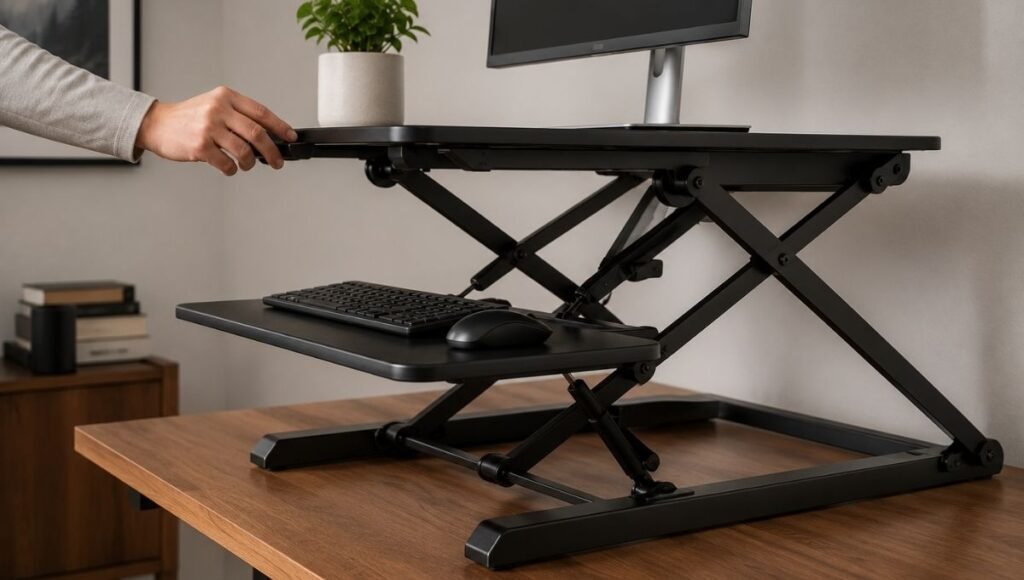
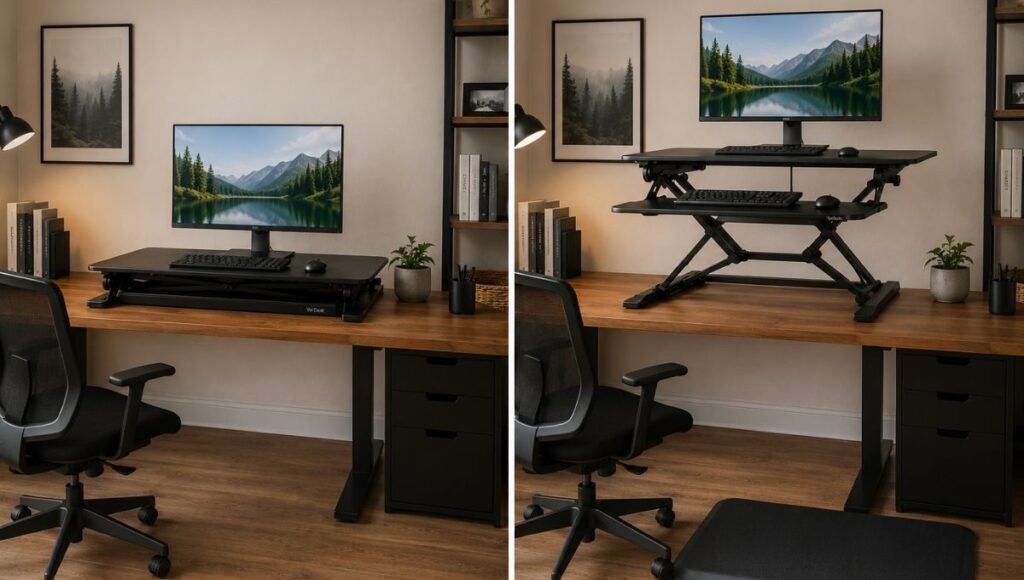
A standing desk converter is a platform that sits on top of your existing desk and raises to standing height when you want to stand. When you want to sit, it lowers back to desk level — or in some designs, you just lower your chair and use the desk surface normally without moving the converter.
The appeal over a full standing desk is straightforward: you don’t replace your existing desk. If you have a desk you like — the right size, the right storage, the right position in the room — a converter adds the standing function without giving any of that up. It’s also significantly less expensive than a full electric sit-stand desk ($80–$350 for most converters vs $400–$800+ for a decent electric desk).
The tradeoff is that a converter adds height and visual bulk to your desk. When lowered, a converter platform sits on the desk surface — which reduces the usable desk area and adds visual complexity. For people with small desks or setups that already feel crowded, this is worth considering before buying.
Two main converter types:
- Z-lift or X-lift converters: A spring-assisted mechanism raises and lowers the platform. Most converters fall in this category. They hold a monitor, keyboard, and mouse at standing height and lower as a unit. The spring mechanism makes raising and lowering one-handed — you lift the platform, it rises to a preset height; you press a lever, it lowers. These range from $80 (budget, less stable) to $400+ (well-built, stable under heavier monitor setups).
- Fixed-height risers: A platform that sits at standing height permanently — you stand when using it, sit elsewhere when you don’t. Much simpler, much less expensive ($30–$80), but requires moving to a different spot to sit. Works well for setups where standing is the primary mode and sitting is occasional, or as a second workstation.
Standing Desk Benefits: What the Research Actually Says
The standing desk category has accumulated a significant amount of marketing hype that overstates what standing actually does. The honest summary of the research:
What standing desks reliably do: Reduce sedentary time. A 2016 study published in the BMJ found that participants with standing desk access reduced their sitting time by approximately 100 minutes per workday compared to control groups. Less unbroken sitting correlates with reduced lower back discomfort and improved energy levels for many office workers.
What standing desks don’t reliably do: Burn significant calories, reverse the metabolic effects of prolonged sitting, or make extended work sessions healthier in isolation. Standing all day has its own set of problems — leg fatigue, varicose vein risk, foot pain — and is not a net improvement over sitting all day. The benefit is in the alternation, not in standing itself.
The research-supported protocol: Alternate between sitting and standing throughout the day. The specific ratio varies by study, but a commonly cited target is 30 minutes sitting followed by 5–10 minutes standing, repeated throughout the workday. More important than the exact ratio: the movement between positions is what provides the benefit, not either position held static.
This is why a standing desk converter can be as effective as a full standing desk — what matters is whether you actually use it to alternate, not whether you have a $700 electric desk.
Standing Desk Height: Getting the Position Right
The standing desk height calculation is the same principle as seated desk height: your elbows should be at approximately 90 degrees with your hands on the keyboard. The monitor should be at eye level — the top of the screen at or just below your eye line.
For most adults, the correct standing desk height is 40–44 inches from the floor to the keyboard surface. Taller adults need higher; shorter adults need lower. The quick calculation: measure your elbow height from the floor while standing with arms relaxed at your sides. Subtract 2–4 inches. That’s your target keyboard height.
Most standing desk converters have a fixed maximum height — they raise to one position and stay there. If you’re significantly taller or shorter than average, check the converter’s maximum height against your required standing height before buying. Some converters reach only 18 inches above the desk surface, which may not be enough for a desk that sits at standard height (29–30 inches) for a tall user.
Monitor position matters as much as keyboard position. At standing height, your monitor needs to be higher than when you’re seated. A monitor arm is the cleanest solution — it raises the monitor to the correct eye level at standing height and can be adjusted back down when seated without disturbing the converter. A monitor riser on the converter platform works too, but adds another layer of height complexity. → Monitor Stand Guide — correct screen height for standing and seated use.
Standing Desk Converter: What to Look For Before Buying
Four specifications that determine whether a converter is worth buying:
Weight capacity. The converter needs to hold your monitor (or monitors), keyboard, mouse, and any other items on the platform. A single 27-inch monitor plus keyboard and mouse is typically 15–25 lbs. Dual monitors can reach 30–40 lbs. Budget converters often have weight limits of 15–20 lbs — check this carefully if you’re running a heavy setup or dual monitors.
Platform dimensions. The platform needs to accommodate your monitor base (or arm mount), keyboard, and mouse with comfortable working space. Most converters are 28–36 inches wide. Wider setups (particularly with dual monitors) may need the wider end of this range or a converter specifically designed for dual screens.
Stability at standing height. A converter that wobbles when you type undermines the entire setup — wobble translates through the monitor, which is visually disorienting and physically annoying. This is where cheap converters fail most visibly. Spring-loaded mechanisms that aren’t well-engineered develop wobble under the weight of a monitor. Look for reviews that specifically mention stability under typing load, not just under static weight.
Ease of height adjustment. If raising and lowering the converter requires significant effort or a two-handed operation, you’ll stop using it within two weeks. The sit-stand benefit comes from actually alternating positions throughout the day. A converter that’s annoying to adjust becomes a fixed-height riser by default. Gas-spring or well-calibrated spring mechanisms should raise and lower with light, one-handed effort.
Editor’s note: The minimum viable standing desk converter for a home office — one that’s stable, has adequate weight capacity, and adjusts easily — starts at around $150. The $80 options exist and work for light single-monitor setups, but the stability problems become apparent within the first week of use. The investment in a mid-range converter is worth it if you’re going to use this thing every day.
Standing Desk Mat: Why It’s Not Optional
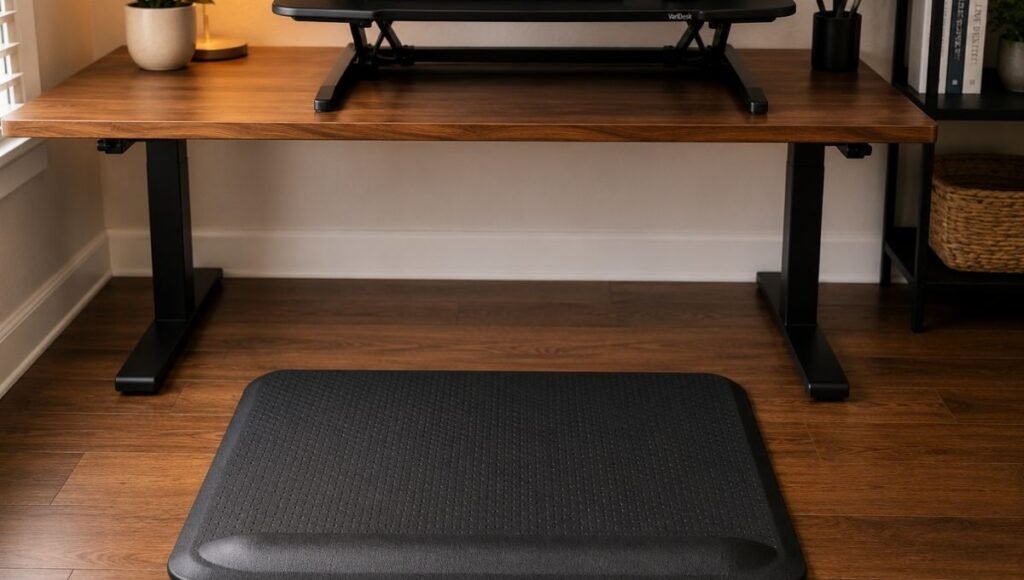
Most people who buy a standing desk converter and stop using it within a month stop because standing on a hard floor is uncomfortable within 30–45 minutes. The converter worked. The floor was the problem.
A standing desk mat — an anti-fatigue mat designed for standing work — addresses this directly. The slightly cushioned, resilient surface reduces the pressure on the feet, legs, and lower back that comes from standing on hard flooring for extended periods. The difference between standing on a hard floor and standing on an anti-fatigue mat is significant enough to change how long you can comfortably stand before wanting to sit down.
The mat goes in front of the desk, in the area where you stand when the converter is raised. Standard dimensions: 20–24 inches deep by 30–36 inches wide. Some mats include a raised ridge or bar at the front edge — this allows you to shift your weight and change foot position while standing, which reduces fatigue more than a flat surface.
If you have carpet, the need for a standing mat is reduced — carpet provides some cushioning. If you have hardwood, tile, or concrete, the mat is essential. → More on foot support during desk work: Footrest Guide.
Standing Desk Setup: Building the Right Routine
The hardware only matters if you actually use it. The standing desk converter that sits permanently at standing height because it’s annoying to lower, or permanently at sitting height because standing felt uncomfortable, is not delivering any benefit.
The setup that actually works in a home office:
Start with 10–15 minutes standing per hour. Not 50% of the day from the start — that’s physically taxing and most people give up. Start small: stand for one or two 10-minute periods per working day for the first week. Increase gradually as standing becomes comfortable rather than effortful.
Use transition cues. The most common reason people forget to alternate is that there’s no trigger. A simple timer — even the phone’s built-in timer — set for 45 minutes reminds you to transition. The transition itself then becomes a habit rather than something that requires active decision-making.
Move during standing time. Standing still is more tiring than standing with occasional small movements. Shifting weight, doing subtle foot movements, or even just having a conversation while standing all make the standing period easier. The anti-fatigue mat helps with this by providing a surface that naturally encourages micro-movements.
Accept that some days are sitting days. The goal is reducing prolonged unbroken sitting — not eliminating sitting. On days with back-to-back calls or intense focused work where transitions are genuinely disruptive, sitting all day is fine. The habit matters over weeks, not over individual days.
Standing Desk Accessories: What Actually Adds Value
Beyond the converter and the mat, a few accessories make a standing setup meaningfully more functional:
Monitor arm: Allows the monitor height to be adjusted independently of the converter platform, so the eye-level position is correct at both standing and seated heights. Without an arm, the monitor is at one height when the converter is up and a different height when it’s down — neither may be exactly right. → Full desk setup guide including monitor arm considerations.
Wireless keyboard and mouse: On a converter platform, cable management becomes more complex because the platform moves up and down. Wireless peripherals eliminate this problem entirely — no cables to manage as the converter height changes.
Laptop stand on the converter: If you use a laptop rather than a desktop, a laptop stand on the converter platform raises the screen to eye level while the keyboard sits at the correct position on the platform below it (or use an external keyboard — same principle as for seated laptop use).
L Shaped Standing Desk and Corner Options: When You Need More Space
Converters are designed for standard rectangular desks. For L-shaped or corner desk setups, two approaches work:
A wider converter placed on the main desk section covers the primary working area. The corner section stays at regular desk height for reference materials, secondary monitors, or non-computing work. This is the most common setup and doesn’t require any special product.
For full corner coverage, standing desk pads that cover the corner junction are available — though these are essentially anti-fatigue mats for the floor rather than converters for the desk surface.
A standing desk with drawers — a full electric desk rather than a converter — makes more sense for L-shaped setups where you want the entire surface to adjust. Converters don’t address the secondary desk section.
If You Only Have 10 Minutes to Test Whether This Is Right for You
Before buying anything: stand at your desk right now and place a stack of books under your keyboard and monitor. Are your elbows roughly at 90 degrees? Is the monitor at approximately eye level? Stand for 10 minutes and do some actual work.
If that felt fine — even good — a converter will be useful. If your back was uncomfortable immediately, check whether it’s the standing position itself or the hard floor. Add a folded towel or yoga mat under your feet and try again. If the discomfort goes away, you need a standing mat. If it persists regardless, standing work may not be the right intervention for your specific physical situation.
The book test costs nothing and tells you more about whether you’ll actually use a standing desk than any product review.
Frequently Asked Questions
What is a standing desk converter?
A standing desk converter is a platform that sits on top of your existing desk and raises your monitor, keyboard, and mouse to standing height. When you want to sit, you lower the converter back to desk level (or lower your chair to use the desk surface normally). It lets you add sit-stand functionality to your existing setup without replacing your desk, at a significantly lower cost than a full electric standing desk.
Is a standing desk converter worth it?
Yes, if you’ll actually use it. The research on sit-stand alternation is consistent — reducing prolonged unbroken sitting has measurable benefits for lower back comfort and energy levels. A converter is worth it if you have a desk you like and don’t want to replace, if your budget doesn’t extend to a full electric standing desk, or if you want to test whether standing work suits you before committing to a full desk. It’s not worth it if you’ll use it for two weeks and revert to sitting full-time — and that outcome is more likely without a standing mat and a habit-building routine.
What is the correct standing desk height?
The same principle as seated desk height: elbows at approximately 90 degrees with hands on the keyboard. For most adults, this is 40–44 inches from the floor to the keyboard surface. Taller users need higher; shorter users need lower. The easiest measurement: stand with arms relaxed at your sides and measure from the floor to your elbow. Subtract 2–4 inches for the keyboard surface height.
How long should you stand at a standing desk?
Research supports a sit-stand alternation pattern rather than extended standing. A commonly cited target is 30–60 minutes sitting followed by 5–15 minutes standing, repeated throughout the day. Standing all day is not the goal — it creates its own physical problems and isn’t significantly better than sitting all day. The benefit is in the movement between positions and the reduction of prolonged unbroken sitting.
Do you need a mat for a standing desk?
On hard floors (hardwood, tile, concrete): yes, an anti-fatigue standing mat is effectively required for comfortable extended standing. Without it, foot and leg fatigue builds within 30–45 minutes and most people stop using the standing position. On carpet: the cushioning provides some of the same benefit, but a mat still helps for extended standing periods. A standing mat is not expensive ($30–$80) and is one of the highest-value accessories for any standing desk setup.
Stand When It Helps, Sit When It Doesn’t
A standing desk converter is a practical tool for reducing the amount of time you spend sitting in one position. It doesn’t require replacing your desk, your chair, or your entire office setup. It requires a mat, a reasonable converter, and the habit of actually using it — which, once established, becomes genuinely useful rather than another piece of home office furniture that seemed like a good idea.
Start with the book test. If standing works for you, buy a mid-range converter and a mat. Build the habit gradually. The research on sit-stand alternation is consistent: it works when you actually do it.
More from WorkDeskLab:
- How to Set Up a Home Office That Actually Works
- Home Office Layout — Where to Put Your Desk
- Monitor Stand — Correct Screen Height for Any Setup
- Desk Setup Guide — Building a Workspace That Actually Works
References: Buckley JP et al. — “The sedentary office: an expert statement on the growing case for change towards better health and productivity,” British Journal of Sports Medicine (BMJ), 2015 · Pronk NP et al. — “Reducing occupational sitting time and improving worker health,” Preventing Chronic Disease, CDC, 2012
WorkDeskLab is reader-supported. If we recommend a product, we may earn a small affiliate commission at no extra cost to you. This never influences what we recommend. See our Affiliate Disclosure for details.