
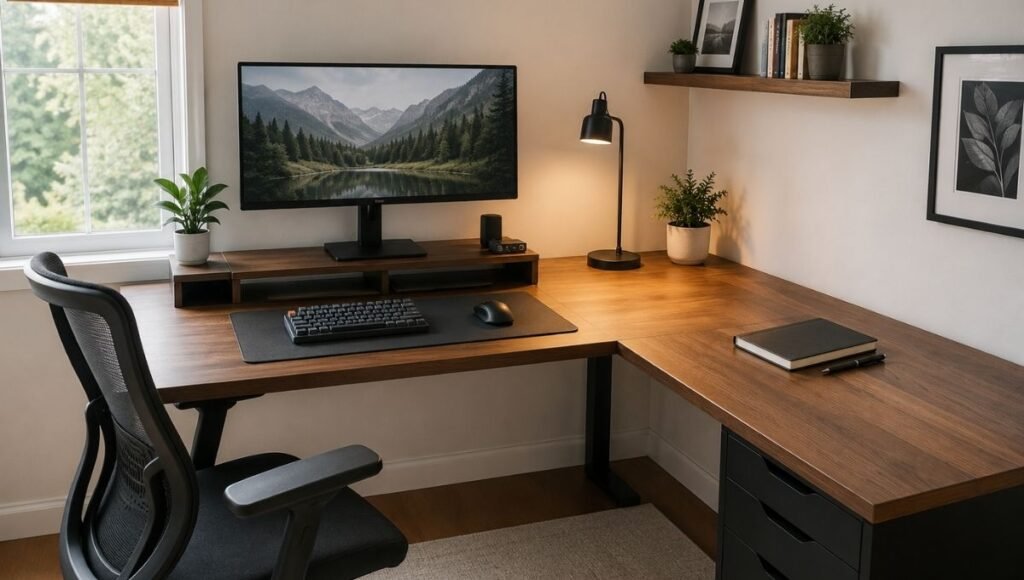
The corner of a room is the most wasted space in most home offices.
It’s where things accumulate — the printer nobody uses anymore, the stack of papers from a project that ended six months ago, the extension cord that’s been there since the desk was assembled. The corner exists, and most desk setups either ignore it completely or treat it as storage overflow rather than workspace.
An L shaped desk changes the geometry of the whole room by making that corner into a functional junction point. Two surfaces meeting at 90 degrees means you can have your primary computing setup on one wing and a completely separate area for everything else — documents, a second screen, physical work, reference materials — without either side bleeding into the other. The desk becomes two workspaces that share a corner rather than one crowded surface.
But the L shaped desk also comes with a specific setup mistake that most people make immediately: putting the monitor in the corner. It seems like the obvious choice — the corner is right in the middle, equidistant from both sides. It’s actually one of the worst positions for a monitor, and it’s one of several setup decisions that determines whether an L shaped desk feels like a genuine upgrade or just a very large surface for accumulating more stuff.
This guide covers the setup decisions that actually matter: where the primary zone goes, how to divide the two wings, how to handle cable management across a larger surface, and how to prevent the second wing from becoming a horizontal filing system within two weeks.
— Daniel Shaw, 7 years working from home, one L shaped desk that transformed how I work after I stopped putting the monitor in the corner
Key Takeaways
- The most common L shaped desk setup mistake: placing the primary monitor in the corner, which forces a sustained body twist and creates neck and lower back strain — position the monitor on one wing directly in front of you instead
- An L shaped desk works best when the two wings serve distinct purposes — a primary zone for focused computing and a secondary zone for everything else — rather than being treated as one large undifferentiated surface
- OSHA ergonomic guidelines identify sustained awkward postures (including sustained torso rotation) as a primary risk factor for musculoskeletal disorders — an L shaped desk setup that forces this posture defeats its own purpose
- Cable management is more complex on an L shaped desk than a standard desk — plan cable routing before finalizing equipment positions, not after
- The corner junction — the deep space where the two wings meet — is the worst place for frequently-used items and the best place for items you want accessible but don’t reach for constantly
L Shaped Desk vs Corner Desk: What’s the Actual Difference
The terms are used interchangeably in most product listings, which creates confusion. Here’s the practical distinction:
A corner desk is typically a single triangular or curved surface designed to fit into a corner — it gives you one continuous work area that happens to be positioned at an angle. The depth is usually limited, and the shape often means the working surface is smaller than it appears in photos.
An L shaped desk has two distinct surface sections — a main desk and a return — that join at a roughly 90-degree angle. Each surface has usable depth, which means you actually get two functional working areas rather than one awkward diagonal one. The junction is where they connect, and the junction is also where most setup mistakes happen.
For a home office, the L shaped desk with two distinct wings is almost always the more functional option. The corner desk’s triangular or curved surface looks elegant but often provides less genuinely usable space than the dimensions suggest.
Where to Position an L Shaped Desk in a Room
Before deciding what goes where on the desk, the desk itself needs to be in the right position in the room. An L shaped desk has more placement options than a standard desk — and more ways to place it poorly.
Corner placement (the most common and usually correct): The desk fits into a room corner, with each wing running along one wall. This maximizes floor space in the rest of the room and uses the corner — which has no other practical function — as the workspace anchor. The desk faces the room rather than a wall, which works well for layouts where you want visibility of the room entrance.
Against one wall, angled out: The main wing runs along the wall and the return extends perpendicular into the room. This works in rooms without a corner available, or where the corner is near a door or window that makes corner placement awkward. It uses more floor space than corner placement but can position the desk better relative to natural light.
Freestanding in the room: Both wings extend into the room space rather than against walls. Creates maximum accessibility around the desk but uses the most floor space. Rarely the right choice for home offices where space is limited.
The natural light rule applies regardless of placement: the primary monitor should have a window to the side, not directly behind the screen (causes glare) and not directly behind you (reflects off the screen). With an L shaped desk in a corner, the window is almost always to one side — which is the correct position. → Full guide: Home Office Layout — desk positioning and light direction.
The Setup Mistake Almost Everyone Makes: The Monitor in the Corner
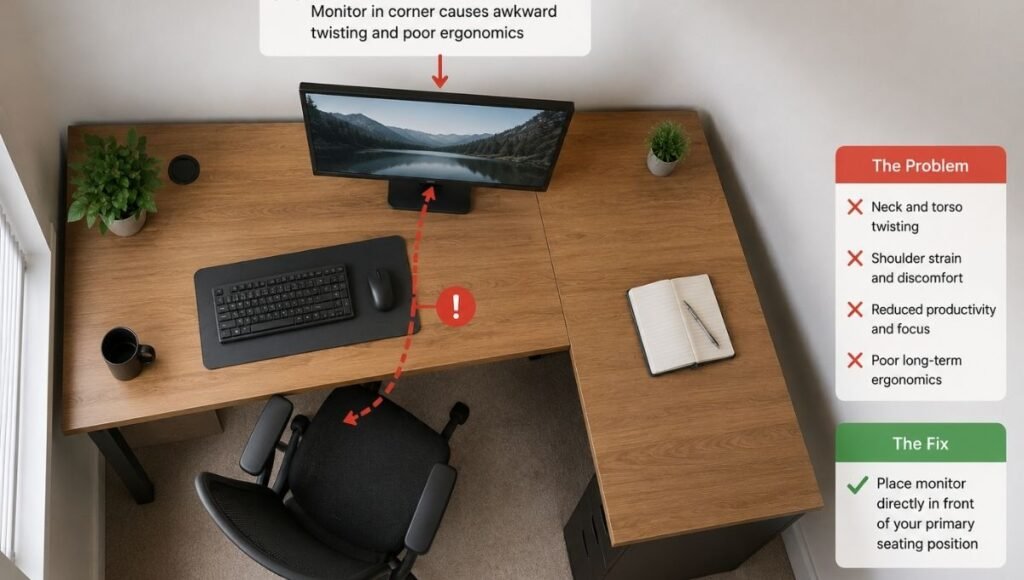
The corner junction of an L shaped desk is the deepest point of the surface — the place where both wings converge. It’s equidistant from both sides, which makes it seem like the logical place for the primary monitor. You can reach it from either direction, it doesn’t crowd either wing, and it looks balanced.
It’s actually the worst position for your primary monitor, for a specific ergonomic reason: to face a monitor placed in the corner, you have to angle your body diagonally. Your legs naturally point along one wing (whichever you’re sitting in front of), but your torso and neck rotate toward the corner. Sustained at this angle for eight hours, this creates a static twist through the lower back, hips, and neck that is a direct contributor to the back and shoulder pain that many L shaped desk users develop without knowing the source.
The correct position: the primary monitor belongs on one wing, directly in front of your body when seated at that wing. The other wing is the secondary zone. Your body faces the primary monitor squarely — no rotation required. When you turn to use the secondary wing, you rotate consciously and briefly, rather than holding a sustained diagonal twist all day.
This single positioning decision changes the ergonomics of an L shaped desk from potentially problematic to genuinely better than a standard desk.
The Two-Wing System: How to Divide Your L Shaped Desk
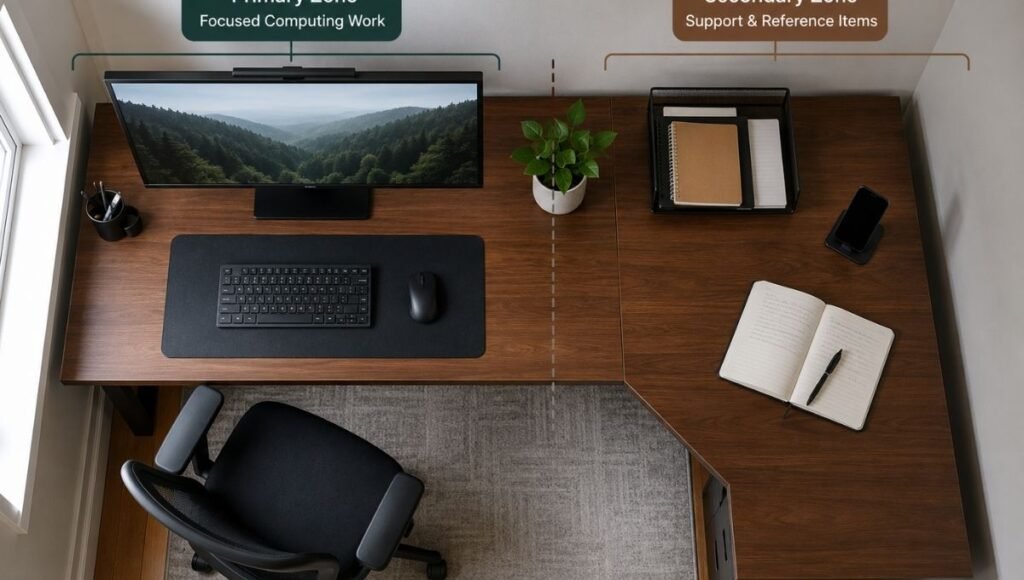
The most effective way to use an L shaped desk is to treat the two wings as distinct zones with different purposes rather than one large continuous surface. This division is what separates an L shaped desk that improves how you work from one that just gives you more surface area to fill with clutter.
Primary wing (your main cockpit):
This is where the majority of your focused work happens. It holds the primary monitor, keyboard, and mouse. When you’re working, you face this wing squarely. Nothing else should compete for primary wing space — no secondary screens angled poorly, no document stacks taking up keyboard clearance, no items requiring you to reach over or around the primary setup.
The primary wing benefits from the same ergonomic rules as any desk: monitor at eye level, keyboard at elbow height, mouse beside the keyboard at the same surface level. → Full desk setup guide with ergonomic positioning.
Secondary wing (your support surface):
This wing handles everything that supports the primary work without competing with it. A secondary monitor (angled toward the primary position, not centered in the corner). Physical documents or a notebook for reference. A printer if needed at the desk. A phone and charging station. Items you reach for regularly but not constantly.
The secondary wing should be organized with the same intentionality as the primary — not used as a catchall for things without a better home. The failure mode of most L shaped desks is the secondary wing becoming a horizontal filing system: things get placed there temporarily and never move.
The corner junction (shallow storage):
The deep corner space where the two wings meet has limited practical utility for frequently-accessed items — it requires reaching across the desk surface to get there. Use it for things you want accessible but don’t need constantly: a plant, a lamp, a charging station for devices not in daily use, or nothing at all. The less you put in the corner junction, the more functional the surrounding wing surfaces become.
Cable Management on an L Shaped Desk
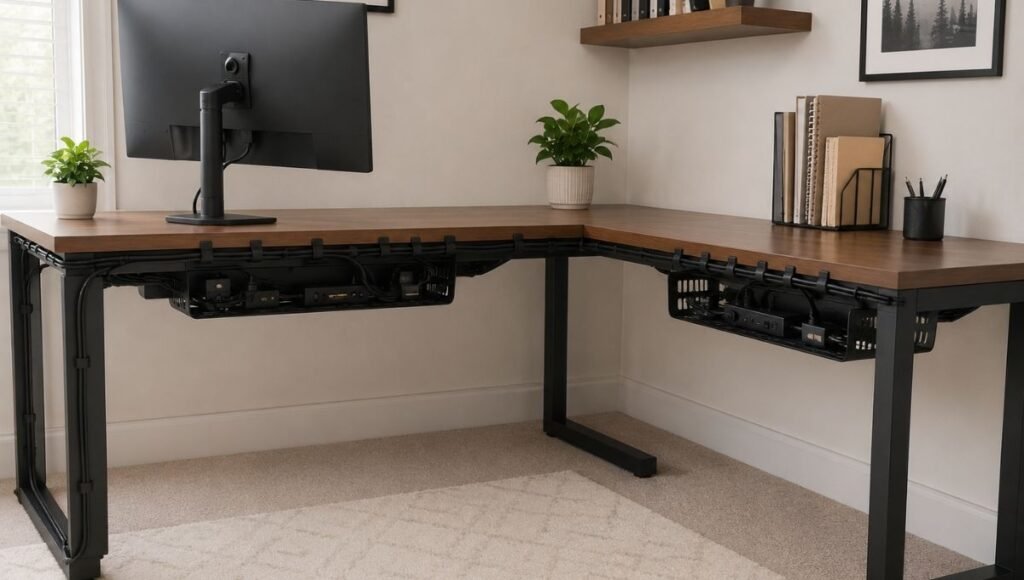
Cable management is more complex on an L shaped desk than a standard desk for an obvious reason: more surface area means more devices, which means more cables, which means more chaos if not managed from the start.
The L shape also creates a cable routing challenge that standard desks don’t have: cables need to travel from devices on both wings to a central power source, and the route from the secondary wing to the power strip typically crosses the corner junction — the exact area where cables accumulate and become most visible.
The system that works for L shaped desks:
One power strip under each wing, not one shared strip: Running all cables from both wings to a single power strip creates a cable concentration point at the corner junction that’s difficult to manage cleanly. Two under-desk cable trays — one under each wing — keeps cables contained to the wing they serve. → Cable Tray Guide — how to choose and install an under-desk tray.
Clip cables along the back edge of each wing separately: Route cables from devices along the back edge of their respective wing before they drop below the desk. This keeps the desk surface cable-free and prevents the corner junction from becoming a cable junction. → Desk Cable Management — how to route cables cleanly without drilling.
A monitor arm on the primary wing: A monitor arm on the primary wing positions the monitor at the correct height, frees up the surface underneath, and provides a built-in cable management channel for the monitor’s display and power cables. On an L shaped desk where cable clutter accumulates, this is particularly valuable. → Monitor Arm Guide — how to choose and install one.
Under Desk Storage: The L Shaped Desk Advantage
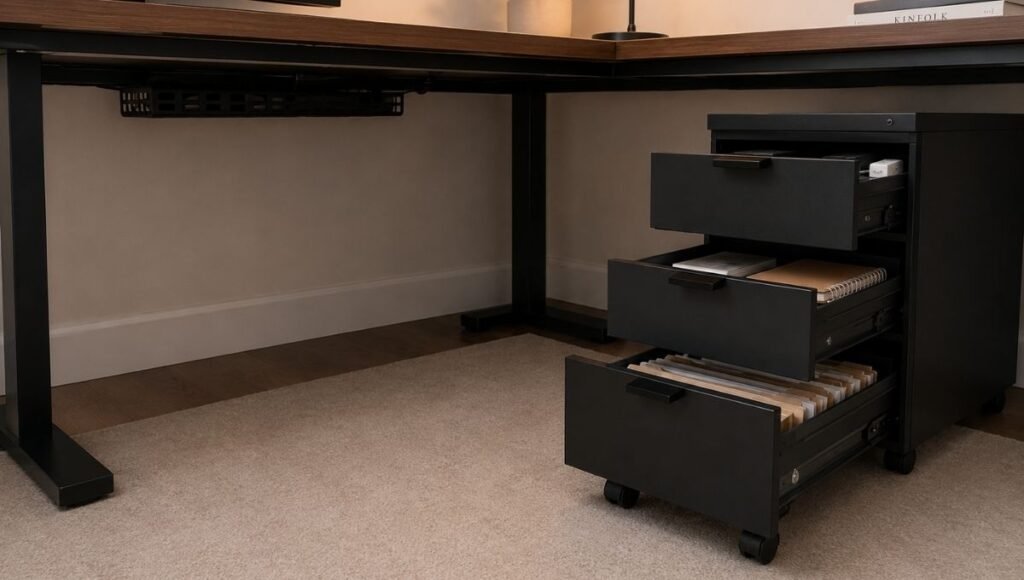
An L shaped desk has more under-desk space than a standard desk — the full depth of both wings, minus the corner junction area. This is one of the genuinely underused advantages of the L shape.
The secondary wing’s under-desk space is particularly useful for storage that needs to be accessible but doesn’t belong on the desk surface. A rolling drawer unit under the secondary wing provides organized storage that can be pulled out when needed and pushed back out of the way when not. File storage, backup supplies, reference materials — all accessible without taking desk surface space.
On the primary wing, the under-desk space benefits from keeping clear for leg room and chair mobility. A power strip tray is about as much as should go under the primary wing. → Under Desk Storage Guide — how to use this space effectively.
Vertical Storage Above the L Shaped Desk
The wall space above an L shaped desk — particularly above the secondary wing — is a significant storage opportunity. A floating shelf at the correct clearance height (22–24 inches above the desk surface) provides organized storage for books, reference materials, and supplies without adding any desk footprint.
The secondary wing is better suited for above-desk shelving than the primary wing, because shelving above the primary monitor affects the visual field and can create a “ceiling” feeling over the main workspace. Above the secondary wing, shelving provides storage without affecting the primary work environment. → Desk Hutch and Shelf Guide — adding storage above the desk correctly.
Keeping the Secondary Wing Organized
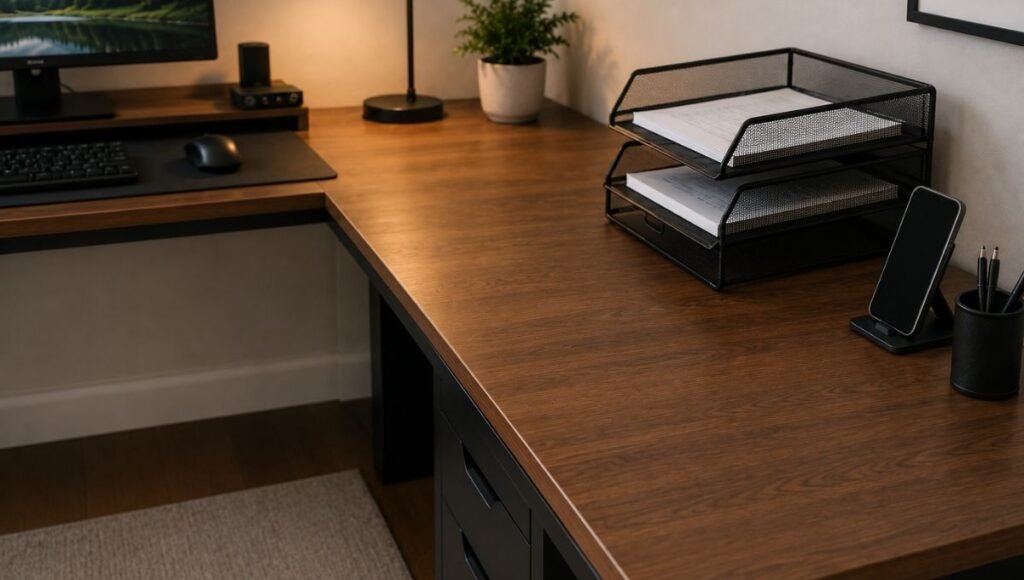
The secondary wing of an L shaped desk has a documented failure mode: within two to four weeks of setting up the desk, the secondary wing becomes a flat storage surface for everything without a better home. Documents pile up. Items from the primary wing migrate over when the primary gets crowded. The secondary wing stops serving its organizational function and becomes a liability rather than an asset.
The system that prevents this:
- Every item on the secondary wing needs a defined purpose there. “It doesn’t fit anywhere else” is not a purpose. If an item doesn’t have a specific reason to be on the secondary wing, it belongs somewhere else — in a drawer, on a shelf, or out of the workspace.
- The secondary wing clears at the end of each day. Five minutes to return items to their homes prevents the accumulation that makes clearing later feel overwhelming. An empty secondary wing at the start of each day keeps the organizational system working.
- Paper goes in a tray, not flat on the surface. A two-tier document tray on the secondary wing gives paper a defined home — active documents in the top tray, reference documents below. Paper without a tray will spread across the entire secondary wing within a week.
→ Desk Organization Ideas — systems that actually hold up over time.
Home Office Desk Ideas: Getting the L Shape Right for Small Rooms
A common concern about L shaped desks in small rooms is that the desk will dominate the space. The counter-intuitive reality: in rooms with usable corners, an L shaped desk often makes the room feel larger, not smaller.
The reason: by using the corner — a space that normally does nothing — the desk removes the need for other furniture items that would otherwise take floor space. A standard desk plus a side table plus a bookshelf takes more total floor space than an L shaped desk that integrates all three functions. The L shape uses vertical corner space efficiently enough to free floor space elsewhere in the room.
For genuinely small rooms: size matters. An L shaped desk where each wing is 48 inches long fits comfortably in a room corner with standard 8-foot ceilings and allows reasonable chair mobility. Larger configurations (60-inch wings) need more room clearance behind the chair — at least 3 feet from the desk back edge to the nearest wall or furniture.
Frequently Asked Questions
What is an L shaped desk?
An L shaped desk is a desk configuration with two surface sections — a main desk and a return — that connect at a 90-degree angle, forming an L shape. The junction can be placed in a room corner, with each wing running along a wall, or extended into the room. The L shape provides two distinct working surfaces that share a corner, making it possible to separate different types of work (computing vs. physical tasks, primary vs. secondary screens) without needing multiple separate pieces of furniture.
What is the difference between an L shaped desk and a corner desk?
The terms are often used interchangeably, but there’s a functional difference. A corner desk is typically a single curved or triangular surface designed to fit into a corner — one continuous work area. An L shaped desk has two distinct surface sections with usable depth on each, providing genuinely separate working zones. For home office use, the L shaped desk with two distinct wings generally provides more functional surface area than a corner desk of similar overall dimensions.
Where should I put my monitor on an L shaped desk?
On one wing, directly in front of your seated position — not in the corner junction. Placing the monitor in the corner forces your body into a sustained diagonal twist (torso and neck rotated toward the corner while your legs point along one wing), which creates back and shoulder strain over time. The primary monitor belongs on the wing where you do the majority of your focused work, centered in front of your body so you face it squarely without rotation.
Can an L shaped desk work in a small bedroom?
Yes, often better than a standard desk, because it uses the corner — space that’s otherwise wasted — as the desk’s anchor point. In a small bedroom, an L shaped desk with 48-inch wings on each side fits into a standard corner and leaves the rest of the room floor space open. The key measurement to check: there should be at least 3 feet of clearance between the back edge of the chair (when seated) and the nearest wall or furniture behind the desk.
How do I keep an L shaped desk organized?
Divide the two wings deliberately: primary wing for computing and focused work, secondary wing for everything that supports that work. Keep the corner junction clear or use it only for items you don’t reach for frequently. Clear the secondary wing at the end of each day before items accumulate. Give every item a specific home — the failure mode of most L shaped desks is the secondary wing becoming a flat storage surface for items without a better location.
The Space You Actually Have
An L shaped desk works when the setup respects what the shape actually provides: two separate working surfaces, not one large one. The primary wing is a cockpit — focused, ergonomic, clear. The secondary wing is a support surface — intentional, organized, cleared daily. The corner junction is shallow storage — not where important things live.
Get the monitor off the corner. Divide the wings by purpose. Manage the cables from the start. The desk stops being a large surface to fill and starts being a workspace that genuinely fits how you work.
More from WorkDeskLab:
- How to Set Up a Home Office That Actually Works
- Home Office Layout — where to position your desk in the room
- Desk Setup Guide — the complete ergonomic workstation
- Desk Organization Ideas — systems that actually hold up
- Desk Cable Management — hiding every wire without drilling
- Under Desk Storage — how to use the space you’re wasting
- Desk Hutch and Shelf — adding storage above the desk
- Monitor Arm — freeing up desk surface and adjusting screen position
References: OSHA — Computer Workstations eTool: Neutral postures and awkward posture risk factors for musculoskeletal disorders (osha.gov) · Cornell University Human Factors and Ergonomics Research — Workstation layout and sustained posture guidelines for home office environments (ergo.human.cornell.edu)
WorkDeskLab is reader-supported. If we recommend a product, we may earn a small affiliate commission at no extra cost to you. This never influences what we recommend. See our Affiliate Disclosure for details.